|
<< Click to Display Table of Contents >> Billed Unpaid Claims |
  
|
|
<< Click to Display Table of Contents >> Billed Unpaid Claims |
|
The Billed Unpaid Claims Dashboard offers insights into claims that have been submitted to payers but remain unpaid. It displays the total number and dollar amount of UB claims and 1500 claims, providing visibility into outstanding receivables. The data is further broken down by Payer Type, Stay Type, Sub Type, Service Code, and Insurance Company, enabling targeted analysis to support follow-up and collections efforts.
Select Web Client > Report Dashboard > Interactive Reports & Dashboards > Billed Unpaid Claims
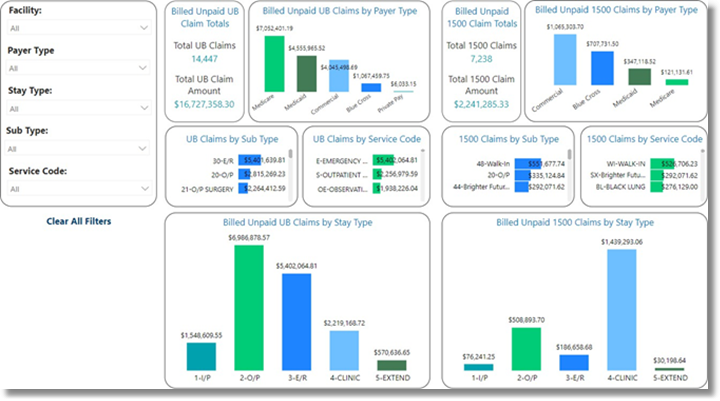
Billed Unpaid Claims
Filters
Filters can be applied to refine the data displayed. Each filter features a drop-down menu with a built-in search field, allowing for efficient selection of specific criteria.
•Facility: Use the drop-down menu to select a specific facility.
•Payer Type: Use the drop-down menu to select a specific Payer Type.
•Stay Type: Use the drop-down menu to select a specific Stay Type.
•Sub Type: Use the drop-down menu to select a specific Sub Type.
•Service Code: Use the drop-down menu to select a specific Service Code.
•Insurance Company: Use the drop-down menu to select a specific Insurance Company.
•Clear All Filters: Select this option to clear all previously applied filters.
NOTE: If no filters are selected, the data will populate using the default setting of All.
Slicers
The following slicers are available to further refine the Billed Unpaid UB and 1500 Totals by Selection dashlets:
•Sub Type
•Service Code
•Insurance Company