|
<< Click to Display Table of Contents >> Inpatient Readmissions |
  
|
|
<< Click to Display Table of Contents >> Inpatient Readmissions |
|
The Inpatient Readmissions Dashboard displays the total number of patients readmitted to an inpatient status within 30 days of their initial admission, based on CMS criteria. It provides detailed breakdowns by insurance company and time intervals (monthly, weekly, and daily). The dashboard also includes comprehensive data for both the initial admission and the corresponding readmission visits.
Select Web Client > Report Dashboard > Interactive Reports & Dashboards > Inpatient Readmissions
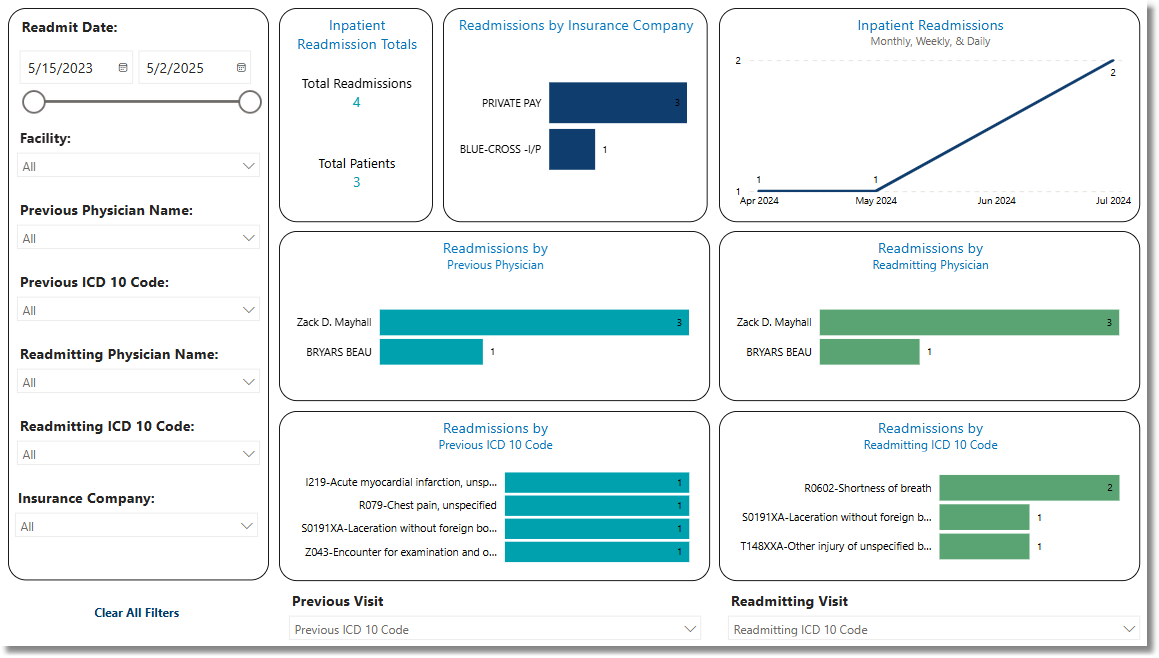
Inpatient Readmissions
Metrics
•Total Readmissions: The number of patients who were readmitted to an inpatient status within 30 days of their initial hospital admission.
•Total Patients: The total number of patients admitted with an inpatients status.
Filters
Filters can be applied to refine the dashlet totals. Each filter features a drop-down menu with a built-in search field, allowing for efficient selection of specific criteria.
•Readmit Date: Use the calendar or slider to specify the Readmit Date range to be used.
•Facility: Use the drop-down menu to select a specific facility.
•Previous Visit Physician Name: Use the drop-down menu to select a specific physician.
•Previous Visit Insurance Company: Use the drop-down menu to select a specific Insurance Company.
•Previous Visit ICD10 Code: Use the drop-down menu to select a specific ICD10 Code.
•Previous Visit Discharge Code: Use the drop-down menu to select a specific Discharge Code.
•Previous Visit Sub Type: Use the drop-down menu to select a specific Sub Type.
•Previous Visit Service Code: Use the drop-down menu to select a specific Service Code.
•Previous Visit Age at Admit: Use the drop-down menu to select a specific Visit Age at Admit.
•Previous Visit Clear All Filters: Select this option to clear all previously applied filters.
•Readmit Visit Physician Name: Use the drop-down menu to select a specific physician.
•Readmit Visit Insurance Company: Use the drop-down menu to select a specific Insurance Company.
•Readmit Visit ICD10 Code: Use the drop-down menu to select a specific ICD10 Code.
•Readmit Visit Discharge Code: Use the drop-down menu to select a specific Discharge Code.
•Readmit Visit Sub Type: Use the drop-down menu to select a specific Sub Type.
•Readmit Visit Service Code: Use the drop-down menu to select a specific Service Code.
•Readmit Visit Age at Admit: Use the drop-down menu to select a specific Visit Age at Admit.
•Readmit Visit Clear All Filters: Select this option to clear all previously applied filters.
NOTE: If no filters are selected, the data will populate using the default setting of All.
Slicers
The following slicers are available to further refine the data displayed in the corresponding dashlets:
•Month
•Week
•Day
•Physician
•Insurance
•ICD10
•Discharge Code
•Sub Type
•Service Code
•Age