|
<< Click to Display Table of Contents >> Description and Usage |
  
|
|
<< Click to Display Table of Contents >> Description and Usage |
|
This report allows the Coding Summary to be printed for multiple patients at one time. The report will display a summary of the coding that was completed on the Grouper.
The primary purpose of the Coding Summary is to provide Medical Records with a printed document with current diagnosis and procedure codes that have been entered for individual patients. Because the anticipated reimbursement, charges-to-date and geometric length of stay is provided, coordinators can monitor and manage patient stays in a more efficient and effective manner. Physicians may use these documents to verify diagnosis and procedure codes entered for their patients.
Demographics

Listed below is an explanation of each column.
•Patient Account: Pulls from the Registration and ADT screen
•Patient Name: Pulls from Patient tab on the Registration and ADT screen
•Age: Pulls from Patient tab on the Registration and ADT screen
•Sex: Pulls from Patient tab on the Registration and ADT screen
•MR# (Medical Record Number): Pulls from Patient tab on the Registration and ADT screen
•Room:Pulls from the Registration and ADT screen
•Department: Pulls the department /nursing station associated with the patient's room
•Address/City/State/County/Zip: Pulls from Patient tab on the Registration and ADT screen
•Admit Date: Pulls from Stay tab on the Registration and ADT screen
•Admit Code: Pulls from Stay tab on the Registration and ADT screen
•Disch Date (Discharge Date): Pulls from Stay tab on the Registration and ADT screen
•Disch Code (Discharge Code): Pulls from Stay tab on the Registration and ADT screen
•Service Cd (Service Code): Pulls from Patient tab on the Registration and ADT screen
•Financial Class: Pulls from Guarantor/Ins tab on the Registration and ADT screen
Physicians

Listed below is an explanation of each column.
•Physician Name: Pulls from the Patient's Physician list on the Procedures screen in the Grouper
•Physician Number: Pulls from the Patient's Physician list on the Procedures screen in the Grouper
•Role/Type: Pulls from the Patient's Physician list on the Procedures screen in the Grouper
Chief Complaint/Admitting Diagnosis/Reason for Visit

Listed below is an explanation of each column.
•Code: Pulls from the Diagnosis and Chief Complaint screens on the Grouper
•Description: Pulls from the Diagnosis and Chief Complaint screens on the Grouper
Diagnosis Codes
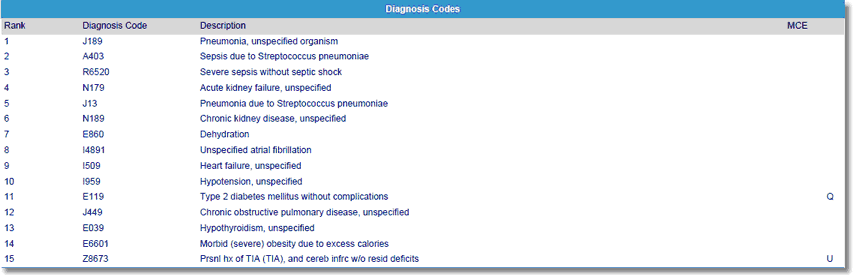
Listed below is an explanation of each column.
•Rank: Pulls from the Diagnosis screen on the Grouper
•Code: Pulls from the Diagnosis screen on the Grouper
•Description: Pulls from the Diagnosis screen on the Grouper

Listed below is an explanation of each column.
•Rank: Pulls from the Procedures screen on the Grouper
•Code: Pulls from the Procedures screen on the Grouper
•Modifiers: Pulls from the Procedures screen on the Grouper
•Description: Pulls from the Procedures screen on the Grouper
•Date (Procedure Date): Pulls from the Procedures screen on the Grouper
•Surgeon: Pulls from the Procedures screen on the Grouper

Listed below is an explanation of each column.
•DRG/APR DRG: Pulls from the Grouper. The severity/mortality indicator only populates when the 3M APR DRG® Software is utilized within the medical records encoder functionality. Valid indicators are 1, 2, 3 and 4.
•Description: Pulls the description of the DRG which pulls from the appropriate DRG table based on Financial Class
•ALSO (Actual Length of Stay): This value is the calculated number of midnights that a patient is in a bed.
•GLOS (Geometric Length of Stay): The GLOS for the DRG listed in the DRG column.
•Relative Weight: Pulls the relative weight which pulls from the appropriate DRG table based on Financial Class
•Expected Reimbursement: Pulls the expected reimbursement associated with the computed DRG