|
<< Click to Display Table of Contents >> Description and Usage |
  
|
|
<< Click to Display Table of Contents >> Description and Usage |
|
This report is commonly used for E&M, Press Ganey, and other site specific reporting needs. Below is an explanation of each section that displays on the report.
Coding with Item Detail - Demographics

Listed below is an explanation of each column.
•Patient Account: Pulls from the Registration and ADT screen
•Patient Name: Pulls from Patient tab on the Registration and ADT screen
•Admit Date/Time/Code: Pulls from Stay tab on the Registration and ADT screen
•Discharge Date/Time/Code: Pulls from Stay tab on the Registration and ADT screen
•ST (Stay Type): Pulls from Patient tab on the Registration and ADT screen
•Subtype: Pulls from Patient tab on the Registration and ADT screen
•Service (Service Code): Pulls from Patient tab on the Registration and ADT screen
•ER Arrival: Pulls from ER Log on the Registration and ADT screen
•DRG: Pulls from the Grouper
•APR: The severity/mortality indicator only populates when the 3M APR DRG® Software is utilized within the medical records encoder functionality. Valid indicators are 1, 2, 3 and 4.
•Ins (Insurance): Pulls from the Guarantor/Ins tab on the Registration and ADT screen
•Contr Cd (Contract Code): Pulls from the Guarantor/Ins tab on the Registration and ADT screen
Coding with Item Detail - Patient

Listed below is an explanation of each column.
•DOB (Date of Birth): Pulls from Patient tab on the Registration and ADT screen.
•Age: Pulls from Patient tab on the Registration and ADT screen
•Sex: Pulls from Patient tab on the Registration and ADT screen
•SSN (Social Security Number): Pulls from Patient tab on the Registration and ADT screen
•Home Phone: Pulls from Patient tab on the Registration and ADT screen
•Cell Phone: Pulls from Patient tab on the Registration and ADT screen
•Marital Status: Pulls from Patient tab on the Registration and ADT screen
•Patient Address/City/State/County/Zip: Pulls from Patient tab on the Registration and ADT screen
Coding with Item Detail - Guarantor

Listed below is an explanation of each column.
•Name: Pulls from Guarantor/Ins tab on the Registration and ADT screen
•Sex: Pulls from Guarantor/Ins tab on the Registration and ADT screen
•DOB (Date of Birth): Pulls from Guarantor/Ins tab on the Registration and ADT screen
•SSN (Social Security Number): Pulls from Guarantor/Ins tab on the Registration and ADT screen
•Home Phone: Pulls from Guarantor/Ins tab on the Registration and ADT screen
•Cell Phone: Pulls from Guarantor/Ins tab on the Registration and ADT screen
•Employer: Pulls from Guarantor/Ins tab on the Registration and ADT screen
•Occupation: Pulls from Guarantor/Ins tab on the Registration and ADT screen
•Address/City/State/Zip: Pulls from Guarantor/Ins tab on the Registration and ADT screen
Coding with Item Detail - Diagnosis
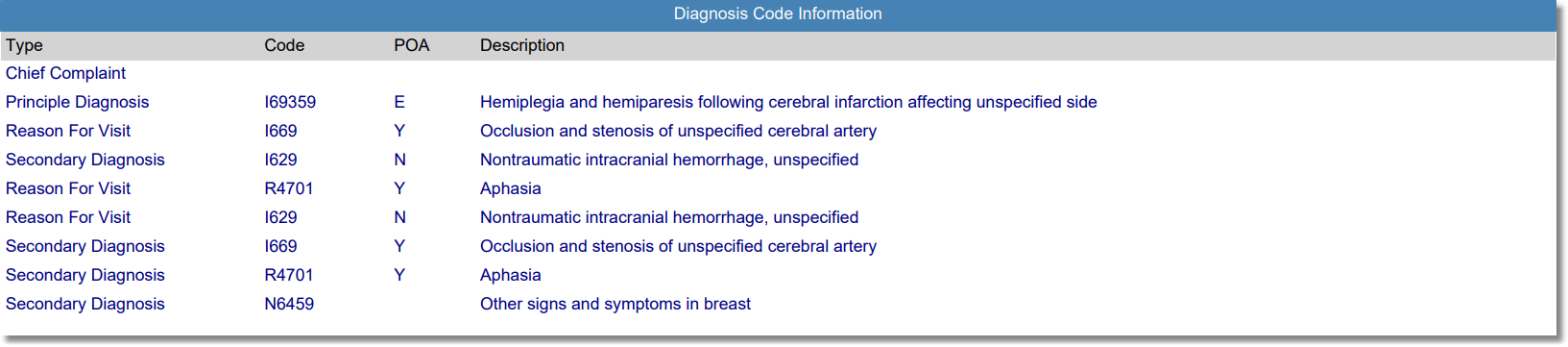
Listed below is an explanation of each column.
•Diagnosis Type: Pulls from the Diagnosis and Chief Complaint screens on the Grouper
•Code: Pulls from the Diagnosis and Chief Complaint screens on the Grouper
•POA (Present on Admission): Pulls from the Diagnosis screen on the Grouper
•Description: Pulls from the Diagnosis and Chief Complaint screens on the Grouper
Coding with Item Detail - Procedure

Listed below is an explanation of each column.
•Code: Pulls from the Procedures screen on the Grouper
•HCPCS: Pulls from the Procedures screen on the Grouper
•Description: Pulls from the Procedures screen on the Grouper
•Modifiers: Pulls from the Procedures screen on the Grouper
•Surgeon: Pulls from the Procedures screen on the Grouper
•2nd Surg (Second Surgeon): Pulls from the Procedures screen on the Grouper
•Proc Date (Procedure Date): Pulls from the Procedures screen on the Grouper
Coding with Item Detail - Physicians

Listed below is an explanation of each column.
•Physician Name: Pulls from the Patient's Physician list on the Procedures screen in the Grouper
•Physician Number: Pulls from the Patient's Physician list on the Procedures screen in the Grouper
•Role/Type: Pulls from the Patient's Physician list on the Procedures screen in the Grouper
Coding with Item Detail - Insurance

Listed below is an explanation of each column.
•Code: Pulls from the Policy Information screen
•Description: Pulls from the Policy Information screen
•Primary: Pulls from the Policy Information screen
•DOB (Date of Birth): The subscriber's Date of Birth from the Policy information screen
•Contract#: Pulls from the Policy Information screen
•Group Info (Group Information): Pulls from the Policy Information screen
•Expected Pay: Pulls the calculated Expected Pay for the financial class
•Reimbursement: Pulls the reimbursement amount entered during insurance receipting
•Contractual: Pulls the contractual amount entered during insurance receipting
Coding with Item Detail - Item Information

Listed below is an explanation of each column.
•Item: Displays the item charged from the patient's Account Detail.
•Description: Pulls the description of the item from Page 1 of the Item Master.
•Quantity: Pulls from the patient's Account Detail.
•SC (Summary Code): Displays the Summary Code attached to the charge. Summary Codes are loaded per item on Page 1 of the Item Master.
•Rev Cd (Revenue Code): Displays the Revenue Code attached to the Summary Code. Revenue Codes are loaded on Page 1 of the Charge Summary Code table.
•AR Date (Accounts Receivable Date): Pulls from the patient's Account Detail.
•Service Dt (Service Date): Pulls from the patient's Account Detail.
•CPT Code: Displays the CPT Code attached to the charge. CPT Codes are loaded on Page 1 of the Item Master.
•Modifiers: Displays any modifiers that were entered on the CPT Charge screen within the Grouper screen.
•Type: Pulls the transaction type from the patient's Account Detail.
•Amount: Displays the current price for the item charged. The Current Price is loaded in the Item Pricing table within the Item Master.
•Cost: The cost is calculated by multiplying the item price listed in the Item Master by the Ratio of Costs to Charges listed in the Charge Summary Code table.