|
<< Click to Display Table of Contents >> Description and Usage |
  
|
|
<< Click to Display Table of Contents >> Description and Usage |
|
The Approved Claims Report can be printed and reviewed weekly. This report pulls by Patient Name and then Financial Class Code. A grand total of Approved claims prints at the end of the report. Two asterisks will appear next to the Approval Received date if it is four days or more after the discharge date.
Claims should move from this report to the Ready to Bill status once the claim meets the criteria for autogenning. Any claim that remains on the report once the account has been coded and lag days have been met should be researched further.
Approved Claims (Chgs Needed)
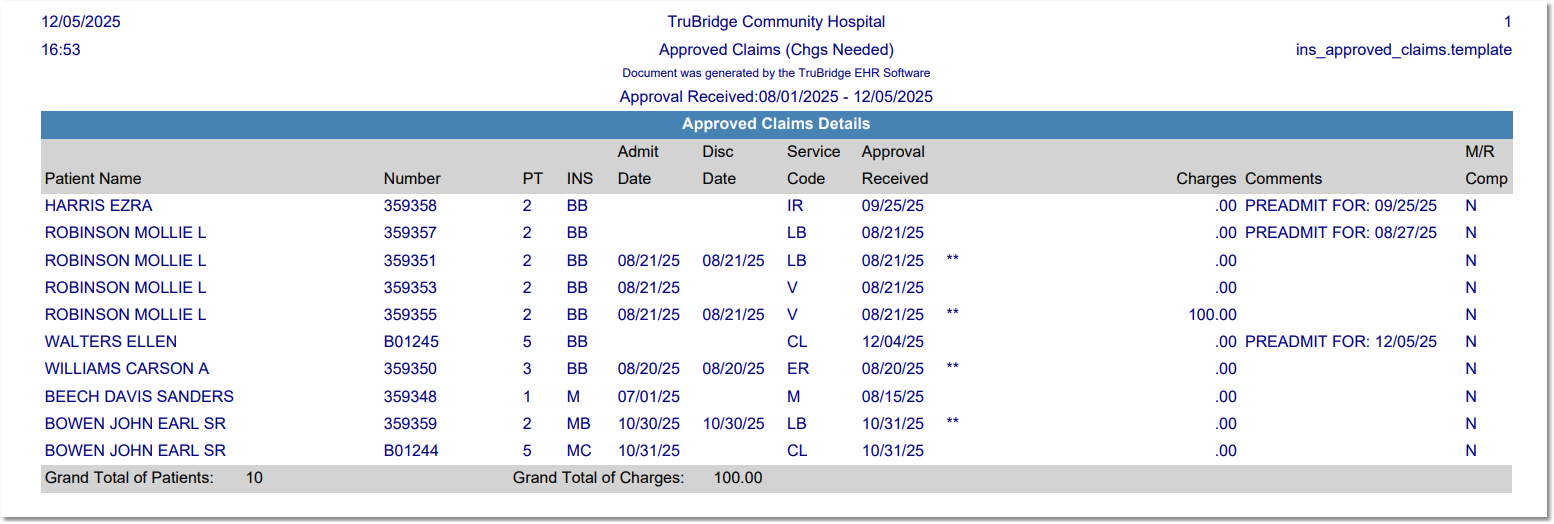
Listed below is an explanation of each column.
•Patient Name: Pulls from the Full Name field in the Patient tab on the Registration and ADT screen.
•Number (Account Number): Pulls from the Registration and ADT screen.
•PT (Stay type): Pulls from the Patient tab on the Registration and ADT screen.
•INS (Insurance Code): The insurance code pulls from the Insurance Claims by Patient screen.
•Admit Date: Pulls from the Stay tab on the Registration and ADT screen.
•Disc Date (Discharge Date): Pulls from the Stay tab on the Registration and ADT screen.
•Service Code: Pulls from the Patient tab on the Registration and ADT screen.
•Approval Received: Pulls from the Policy Information screen.
•Charges: The total amount of charges pulls from Account Detail.
•Comments: The Comments pull from Comments on the Insurance Claims Status screen.
•M/R Comp (Medical Records Complete): A Y indicates Medical Records coding is complete and the Finish Date has been added to the grouper screen. An N indicates that coding is not complete.