|
<< Click to Display Table of Contents >> Description and Usage |
  
|
|
<< Click to Display Table of Contents >> Description and Usage |
|
The Claims with Missing Information (By Phy) report should be printed and worked on a daily basis. The report page breaks and subtotals by physician. The last page of the report ages the expected pay under the columns Current, Over 30, Over 60 and Over 90. The last page also gives the total number of claims for each physician.
Medical Records may use this report to see what needs to be coded. If they are waiting on the doctor to assign a diagnosis, this report may be used to determine which physicians are holding up the billing.
To advance the claim to the Ready to Bill status, the patient’s Account Number should be locked onto, and Insurance should be selected. Verify the Stay Information and all Condition, Occurrence and Value codes in the Coding Screen. After all of this is completed, Detail Charges should be selected. The Ready to Bill and Print Form fields should be selected for all primary claims. Ready to Bill should be selected and Print Form blank for all secondary claims.
If a Non-APC Outpatient claim appears on this report, a reason should be noted in the Comment field of the Insurance Claim Status screen. These claims automatically generate from the Approved status to the Ready to Bill status. Any Non-APC Outpatient claims that appear on this report will need to be manually set to Ready to Bill.
For an APC claim, the system will advance the claim to the Unchecked status and place “APC Claim” in the Comment field once the claim is autogenned. Once the Medical Records Verification Date has been placed on the account, and APC Claims to Ready-to-Bill report has been run, the claim will move to the Ready to Bill status.
NOTE: The advancement of APC claims depend on how the Insurance Company table is set.
Claims With Missing Information (By Physician)

Claims With Missing Information (By Physician Totals)
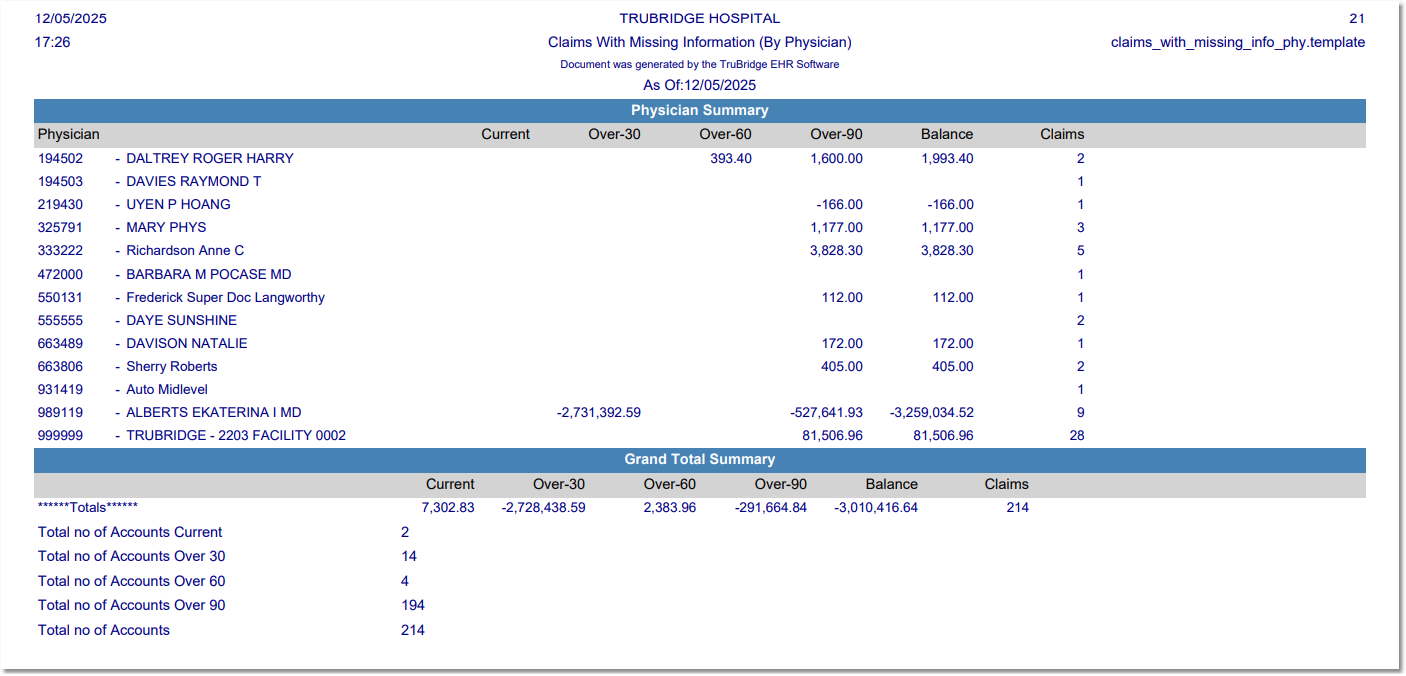
Listed below is an explanation of each column.
•Claim Type: Pulls from the Insurance Claims by Patient screen.
•Account Number: Pulls from the Registration and ADT screen. If this account is a repeat admission within 72 hours, the flag “72H” will print after the Account Number.
•Patient Name: Pulls from the Full Name field in the Patient tab on the Registration and ADT screen.
•Med. Rec.# (Medical Record Number): Pulls from the Patient tab on the Registration and ADT screen.,if the prompt “Print Medical Record Number” is answered Y.
•Discharge Date: Pulls from the Stay tab on the Registration and ADT screen.
•Amount to be Billed: The expected pay amount pulls from the detail charges screen.
•Current: An “X” pulls to this column if the Discharge Date is less than 30 days old.
•30: An “X” pulls to this column if the Discharge Date is over 30 but less than 60 days old.
•60: An “X” pulls to this column if the Discharge Date is over 60 but less than 90 days old.
•90: An “X” pulls to this column if the Discharge Date is over 90 days old.
•# Days: The number of days since discharge.
•Chart Location: The location of the patient’s medical record chart pulls from Medical Records.
•# Days Loca: The number of days that the Medical Record chart has been in its current location.
•Insurance: Pulls from the Insurance Claims by Patient screen.
•M/R Comp (Medical Record Complete): A Y indicates that Medical Records coding is complete and the Finish Date has been added to the grouper screen. A N indicates that coding is not complete. The report is divided into two sections. The first section are accounts that have not been coded, therefore do not have a finish date. The second section are accounts that have been coded, therefore have a finish date.
•Serv Cd (Service Code): Pulls from the Patient tab on the Registration and ADT screen.
•Coder: Pulls the coders initials from the Finish Date field on the Grouper screen.
Totals Section
•Totals: The total amounts for each physician.
•Total Number of Accounts: The number of accounts Current, Over-30, Over-60 and Over-90 past discharge.