|
<< Click to Display Table of Contents >> Description and Usage |
  
|
|
<< Click to Display Table of Contents >> Description and Usage |
|
The Observation Patient/Times Report provides a comprehensive listing of observation accounts that have been admitted to acute care, including the total time and number of days each account spent in observation status. This report helps track observation times for billing compliance and capacity management, ensuring patients are converted to an inpatient appropriately and observation beds are utilized efficiently.
NOTE: This report requires the Auto Observation functionality to be activated.
Observation Patient/Times Report
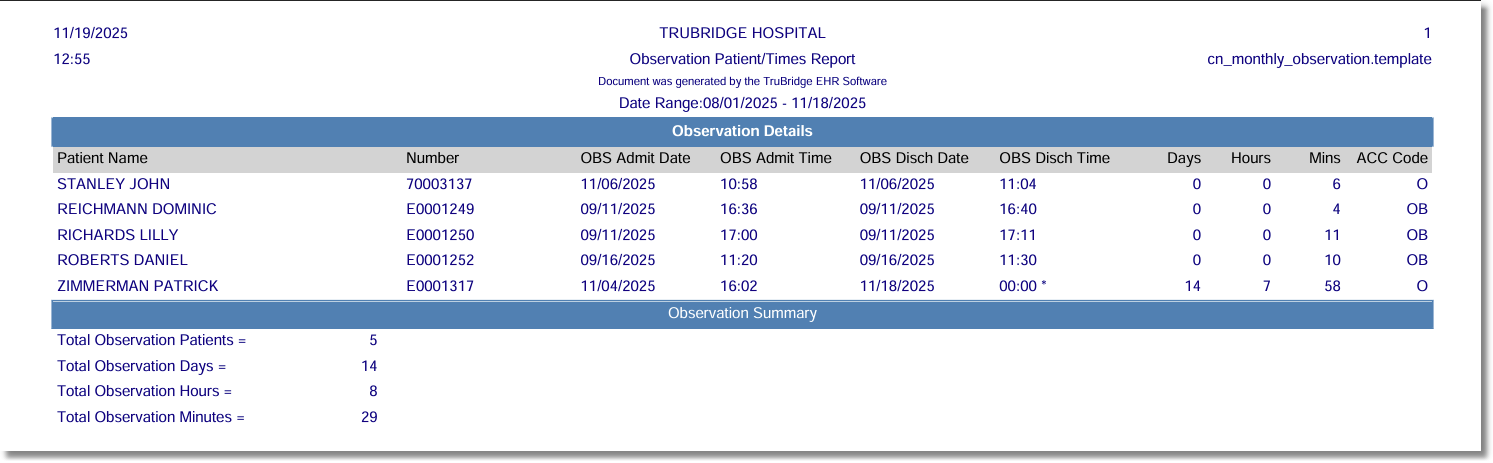
Listed below is an explanation of each column.
•Patient-Name: Pulls from the Patient tab on the Registration and ADT screen.
•Number (Account Number): Pulls from Patient Functions.
•OBS Admit Date: Pulls the observation admission date from the Stay tab on the Registration and ADT screen.
•OBS Admit Time: Pulls the observation admission time from the Stay tab on the Registration and ADT screen.
•OBS Disch Date: Pulls the observation discharge date from the Stay tab on the Registration and ADT screen. If a patient has not been discharged yet, the last day of the date range used to run the report will display and an asterisk will display next to the observation discharge time.
•OBS Disch Time: Pulls the observation discharge date from the Stay tab on the Registration and ADT screen. An asterisk next to the time indicates that a discharge date or time has not been not been entered. If the report is run for the current date, the time the report was run will display.
•Days: Pulls the number of days the patient was observation.
•Hours: Pulls the number of hours the patient was observation.
•Mins: Pulls the number of minutes the patient was observation.
•ACC Code: Pulls the patient's accommodation code.