|
<< Click to Display Table of Contents >> Frequency Maintenance |
  
|
|
<< Click to Display Table of Contents >> Frequency Maintenance |
|
The Frequency Maintenance screen provides the means to enter a new frequency association or edit an existing association. Once values are entered, then the appropriate prescription frequency may be associated to it.
Select Web Client > Tables > Clinical > Frequency Crosswalk > New
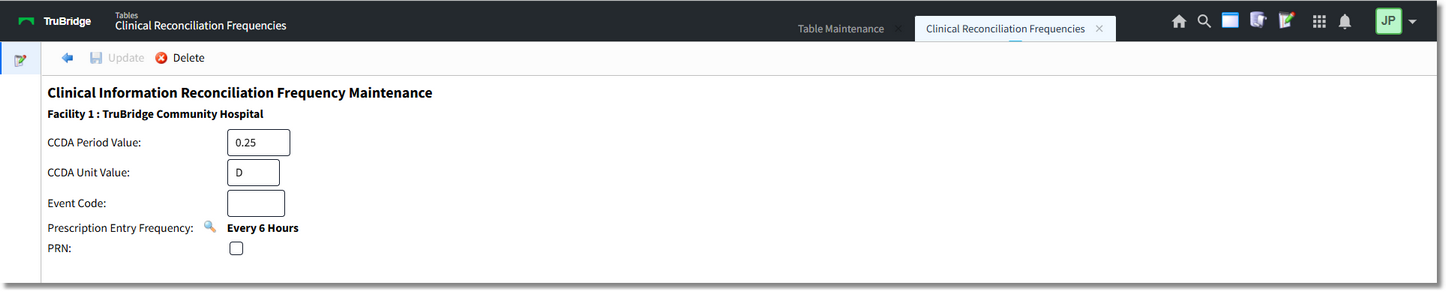
Clinical Information Reconciliation Frequency Maintenance
The following fields are available:
NOTE: Not all fields necessarily need to be addressed depending on the frequency being entered or edited (i.e., period/unit values versus event code). However, it is possible to have a frequency with both period/units and an event code (e.g., 1H and PC for taking a medication one hour after meals).
•CCDA Period Value: Maximum four digits. Allows the entering of a valid period value, e.g., 0.5, 1, 4, 6, 8, 12, etc.
•CCDA Unit Value: Maximum two characters. Allows the entering of a valid unit value, e.g., D, H, MO, WK, etc. Upper and lower case may be used.
•Event Code: Maximum three characters. Allows the entering of a valid event code, e.g., PC, AC, HS, ACM, ICD, etc.
•Prescription Entry Frequency: Select the magnifying glass icon to launch the Prescription Entry Frequencies table. Frequencies may be searched by Frequency, Hospital Frequency or Display Order. Double-click the desired frequency. The selected frequency will display to the right of the magnifying glass icon.
•PRN: Default is unchecked (No). Check the box (Yes) to designate the frequency as PRN. PRN medications have a special section in the CCDA indicating the frequency is PRN instead of standard. Records must be created for the standard frequency and the PRN frequency separately (i.e., a frequency of "Four times a day" could be represented by 6H, and a frequency of "Four times a day as needed" could be represented by 6H with the PRN box checked).
NOTE: The period of time (period and unit values) may be represented by a decimal up to two decimal places instead of a whole number, i.e., .5D or 12H may both be utilized for a medication to be taken twice a day.
When attempting to save a record for an association that already exists, users will be prompted with the message, "This setup (Period, Unit, Event, PRN) is already associated to an existing frequency."
The Action Bar has the following options:
•Back Arrow: Returns to the Frequency Crosswalk table. If unsaved information exists when the Back Arrow is selected, users will be prompted with the message, "Are you sure you wish to exit without saving?" with "Yes" and "No" options. Selecting "Yes" will return to the Frequency Crosswalk table without saving the entered information. Selecting "No" will return to the maintenance screen so that the entered information may be saved.
•Update: Saves the current information and exits back to the Frequency Crosswalk table. This option will become available when new information has been entered.
•Delete: Prompts the user with the message, "Are you sure you wish to remove this record?" with "Yes" and "No" options. Selecting "Yes" will remove the record from the Frequency Crosswalk table. Selecting "No" will return to the maintenance screen. This option will become available when editing an existing record.