|
<< Click to Display Table of Contents >> RUG/PPS Maintenance |
  
|
|
<< Click to Display Table of Contents >> RUG/PPS Maintenance |
|
The RUG/PPS Maintenance tab of the RAI Control Table controls the facility's RUG calculation types, as well as Case Mix Index values, used in determining the RUG scores for reimbursement.
Options on this screen are separated into Federal (Medicare), which encompasses facilities in urban settings and those in rural locations, and State (Medicaid). This information is defined by CMS and/or the facility's state.
NOTE: Any questions regarding the difference between Urban and Rural location or what RUG code grouper or calculation type should be used by the facility should be discussed with these governing bodies.
Federal
•The Rate Table Utilized field allows the user to choose Urban or Rural from a drop-down menu.
•The Calculation Type Utilized field allows the user to select Hierarchical or Index Maximizing from a drop-down menu.
State
•The RUG Code Grouper field allows the user to select any of the following RUG code groupers:
▪34 - RUG III
▪44 - RUG III
▪48 - RUG IV
▪53 - RUG III
▪57 - RUG IV
▪66 - RUG IV
•The Calculation Type Utilized field allows the user to select Hierarchical or Index Maximizing from a drop-down menu.
Select Web Client > Tables > Clinical > RAI Control Table > RUG/PPS Maintenance
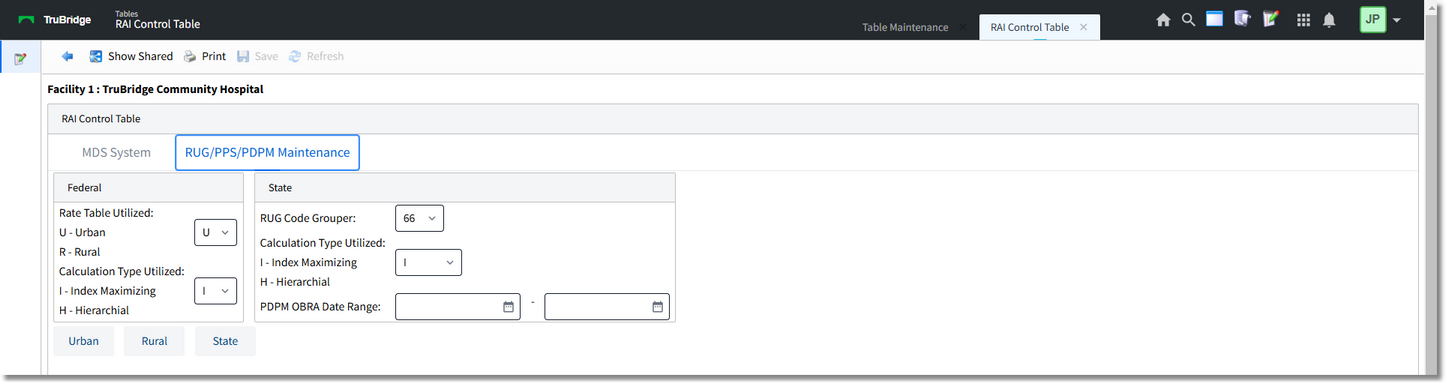
RAI Control Table - RUG/PPS Maintenance
Reimbursement Rate Tables
Additional options allow the user to access the reimbursement rate tables for Urban, Rural, and State; each table functions the same way, but may include different RUG codes and Case Mix Index values. The user then has the ability to apply total reimbursement rate values if needed.
If the user would like to make changes to the Total Rate value or there is a mandated need to update the CMI for Group value, these areas may be addressed by selecting the line to be altered and selecting Edit.
If changes are made, be sure to select Save. Select the back arrow to return to the Rates and Indices listing.