|
<< Click to Display Table of Contents >> Set up Cover Page |
  
|
|
<< Click to Display Table of Contents >> Set up Cover Page |
|
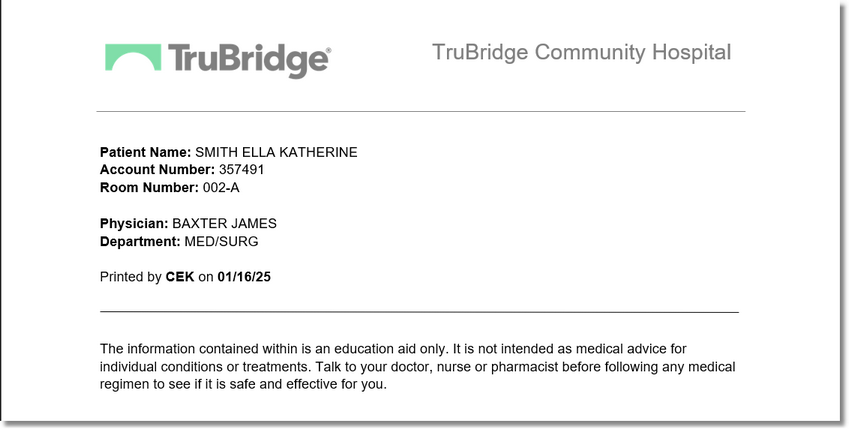
A facility defined cover page may be created to generate with Patient Education Documents when they are printed.
The following TruBridge AR Database codes may be used on the cover sheet to automatically generate data:
•PATNAME: Patient’s name
•PATNUM: Patient’s account number
•PATSEX: Patient’s sex
•PATAGE: Patient’s age
•PATADMIT: Patient’s admission date
•PATDISCHARGE: Patient’s discharge date
•PATMRNUM: Patient’s medical record number
•PATTYPE: Patient’s stay type
•PATROOM: Patient’s room number
•PATBDAY: Patient’s date of birth
•PHYS1NUM: Admitting physician’s number (system number)
•PHYS1NAME: Admitting physician’s name
•PHYS1ABR: Admitting physician’s abbreviated name
•PHYS2NUM: Secondary physician’s number (system number)
•PHYS2NAME: Secondary physician’s name
•PHYS2ABR: Secondary physician’s abbreviated name
•DEPTNAME: Name of department the document is printed from
•PRINTDATE: Date document printed
•PRINTINIT: Initials of person printing document
Select Web Client > Tables > Clinical > Patient Education Maintenance > Setup Cover Page to launch Microsoft Word. Enter the document then save and exit from Word. Select Yes to save the coverpage or No to abort.

Save Changes?
Patient Education Document Cover Page