|
<< Click to Display Table of Contents >> Visit Charges |
  
|
|
<< Click to Display Table of Contents >> Visit Charges |
|
The Visit Charges Dashboard provides insights into Billing by displaying the number of total visits and total charges within a specified admit date range. This dashboard helps evaluate outstanding receivables, assess payment statuses, and prioritize collection efforts. Data can be analyzed by Payer Type, Stay Type, Sub Type, Service Code, Current Insurance Company and Billing Status to support targeted financial and operational decision-making.
Select Web Client > Report Dashboard > Interactive Reports & Dashboards > Visit Charges
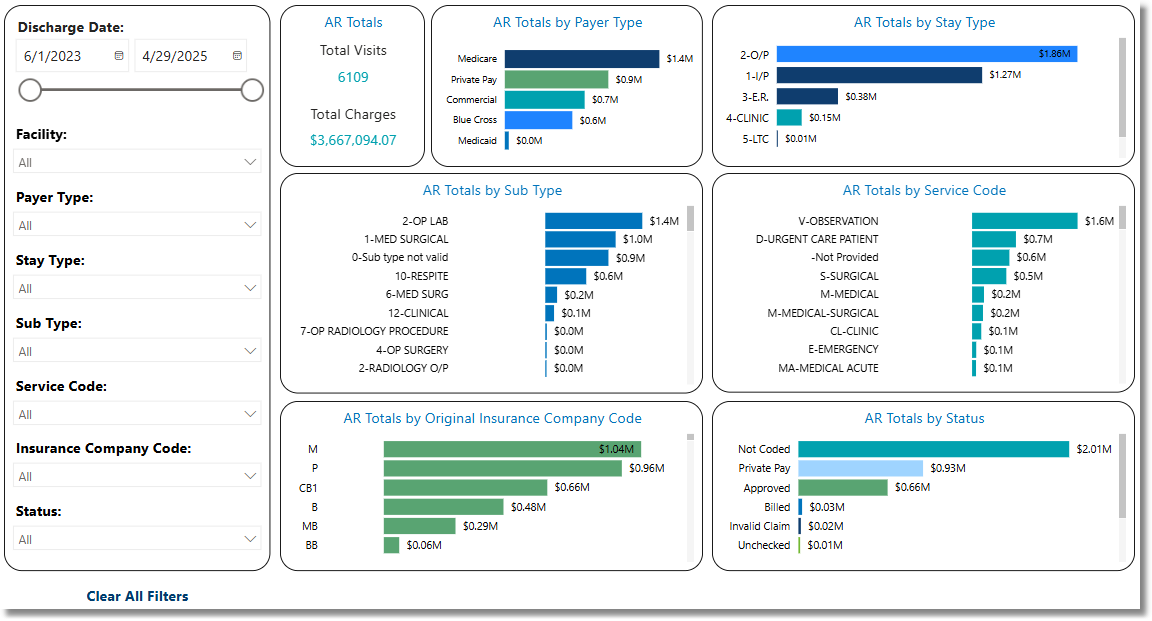
Visit Charges
Filters
Filters can be applied to refine the AR Totals displayed. Each filter features a drop-down menu with a built-in search field, allowing for efficient selection of specific criteria.
•Discharge Date: User the calendar or slider to specify a Discharge Date Range.
•Facility: Use the drop-down menu to select a specific facility.
•Payer Type: Use the drop-down menu to select a specific Payer Type.
•Health Plan: Use the drop-down menu to further evaluate Payment Type. If a facility does not use this field, it will display as blank.
•Stay Type: Use the drop-down menu to select a specific Stay Type.
•Sub Type: Use the drop-down menu to select a specific Sub Type.
•Service Code: Use the drop-down menu to select a specific Service Code.
•Current Insurance Company: Use the drop-down menu to select a specific Insurance Company.
•Status: Use the drop-down menu to select a specific billing status.
•Clear All Filters: Select this option to clear all previously applied filters.
NOTE: If no filters are selected, the data will populate using the default setting of All.
Slicers
The following slicers are available to further customize the dashlets:
•Total Visits
•Total Charges