|
<< Click to Display Table of Contents >> Infectious Disease Tracking |
  
|
|
<< Click to Display Table of Contents >> Infectious Disease Tracking |
|
The Infectious Disease Tracking Dashboard enables users to monitor infectious disease trends to support evidence-based decision-making, enhance situational awareness, and promote coordinated efforts in outbreak prevention and control. The dashboard displays key metrics such as cumulative positive diagnostic tests, the percentage of positive results among newly resulted tests, and the percentage of positives among cumulative resulted tests. Data can be further analyzed by CPT Code, physician, patient state and county, and other relevant criteria, providing a comprehensive view to inform public health response and planning.
Select Web Client > Report Dashboard > Interactive Reports & Dashboards > Infectious Disease Tracking
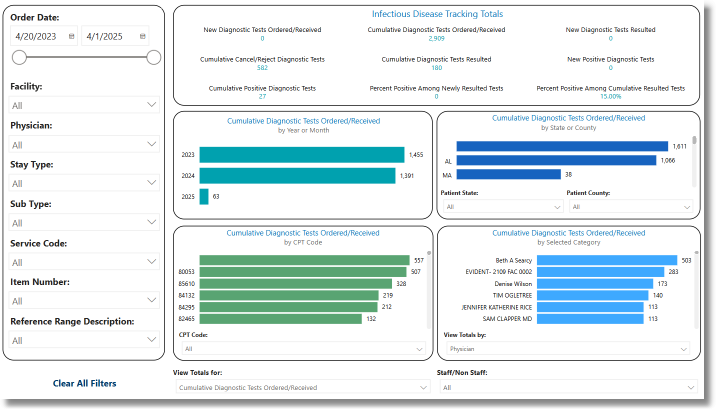
Infectious Disease Tracking
Metrics
•New Diagnostic Tests Ordered/Received: Total orders (with Alpha results) where the order date is within one day of the maximum selected date.
•Cumulative Diagnostic Tests Ordered/Received: Total of all orders (with Alpha results) that meet the report criteria within the selected date range.
•New Diagnostic Tests Resulted: Total orders (with Alpha results) that meet the report criteria where the resulted date is within one day of the maximum selected date and the status is not canceled.
•Cumulative Cancel/Reject Diagnostic Tests: Total orders (with Alpha results) that meet the report criteria and have a status of canceled.
•Cumulative Diagnostic Tests Resulted: Total orders (with Alpha results) that meet the report criteria, have a status that is not canceled, and have a dictated/resulted date populated.
•New Positive Diagnostic Tests: Total orders (with Alpha results) that meet the report criteria, have a status that is not canceled, have a dictated/resulted date within one day, and have an Alpha result value of Positive or Detected.
•Cumulative Positive Diagnostic Tests: Total orders (with Alpha results) that meet the report criteria, have a status that is not canceled, and have an Alpha result value of Positive or Detected.
•Percent Positive Among Newly Resulted Tests: The percentage of newly resulted tests with a positive result, calculated as the number of New Positive Diagnostic Tests, divided by the New Diagnostic Tests Resulted.
•Percent Positive Among Cumulative Resulted Tests: The percentage of cumulative resulted tests that are positive, calculated as the number of Cumulative Positive Diagnostic Tests, divided by the number of Cumulative Diagnostic Tests Resulted.
Filters
Filters can be applied to refine the dashlet totals. Each filter features a drop-down menu with a built-in search field, allowing for efficient selection of specific criteria.
•Order Date: Use the calendar or slider to specify an Order Date range to be used.
•Facility: Use the drop-down menu to select a specific facility.
•Physician: Use the drop-down menu to select a specific physician.
•Stay Type: Use the drop-down menu to select a specific Stay Type.
•Sub Type: Use the drop-down menu to select a specific Sub Type.
•Service Code: Use the drop-down menu to select a specific Service Code.
•Item Number: Use the drop-down menu to select a specific Item Number.
•Reference Range Description: Use the drop-down menu to select a specific Reference Range.
•Clear All Filters: Select this option to clear all previously applied filters.
NOTE: If no filters are selected, the data will populate using the default setting of All.
Slicers
The following slicers are available to further refine the corresponding dashlets:
•Patient State
•Patience County
•CPT Code
•View Totals by:
▪Physician
▪Stay Type
▪Sub Type
▪Service Code
▪Item Number
▪Reference Range Description
▪Staff vs Non Staff
•View Totals for:
▪Cumulative Diagnostic Tests Ordered/Received
▪Cumulative Diagnostic Tests Resulted
▪Cumulative Canceled Diagnostic Tests
▪Cumulative Positive Diagnostic Tests
▪Percent Positive Among Cumulative Resulted Tests
▪New Diagnostic Tests Ordered/Received
▪New Diagnostic Tests Resulted
▪New Positive Diagnostic Tests
▪Percent Positive Among Newly Resulted Tests
•Staff/Non Staff
▪All
▪Non Staff
▪Staff
▪Unknown
The CPT Code field defaults to the COVID-19 testing CPT code 87635. To review other tests on the dashboard, select the CPT Code drop-down, deselect the 87635 check box, and then enter the CPT Code or CPT Code Range for the desired test (e.g., FLU A, FLU B, RSV, etc.).
Select Web Client > Report Dashboard > Interactive Reports & Dashboards > Infectious Disease Tracking > CPT Code Drop-Down
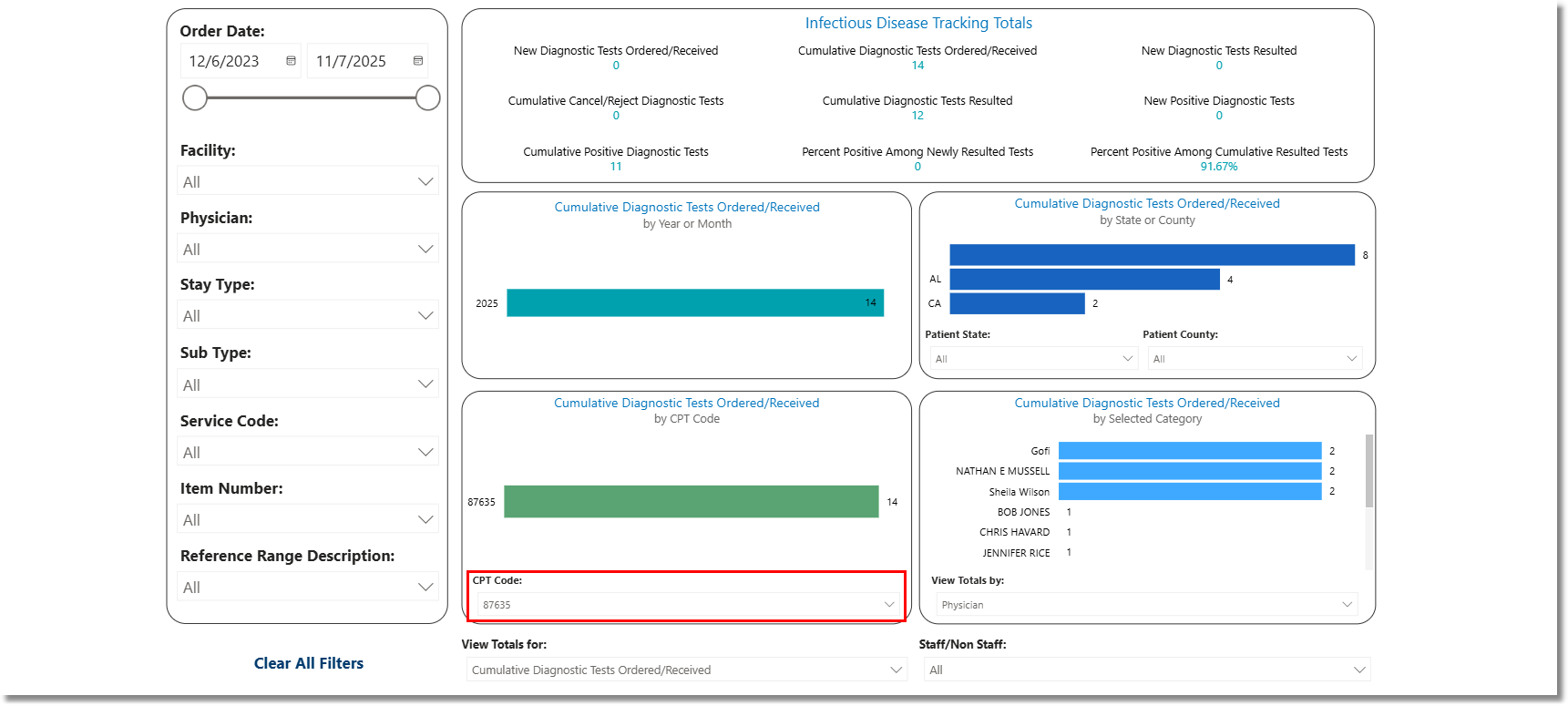
Infectious Disease Tracking - CPT Code Drop-Down
Select Web Client > Report Dashboard > Interactive Reports & Dashboards > Infectious Disease Tracking > CPT Code Drop-Down > Deselect CPT Code 87635
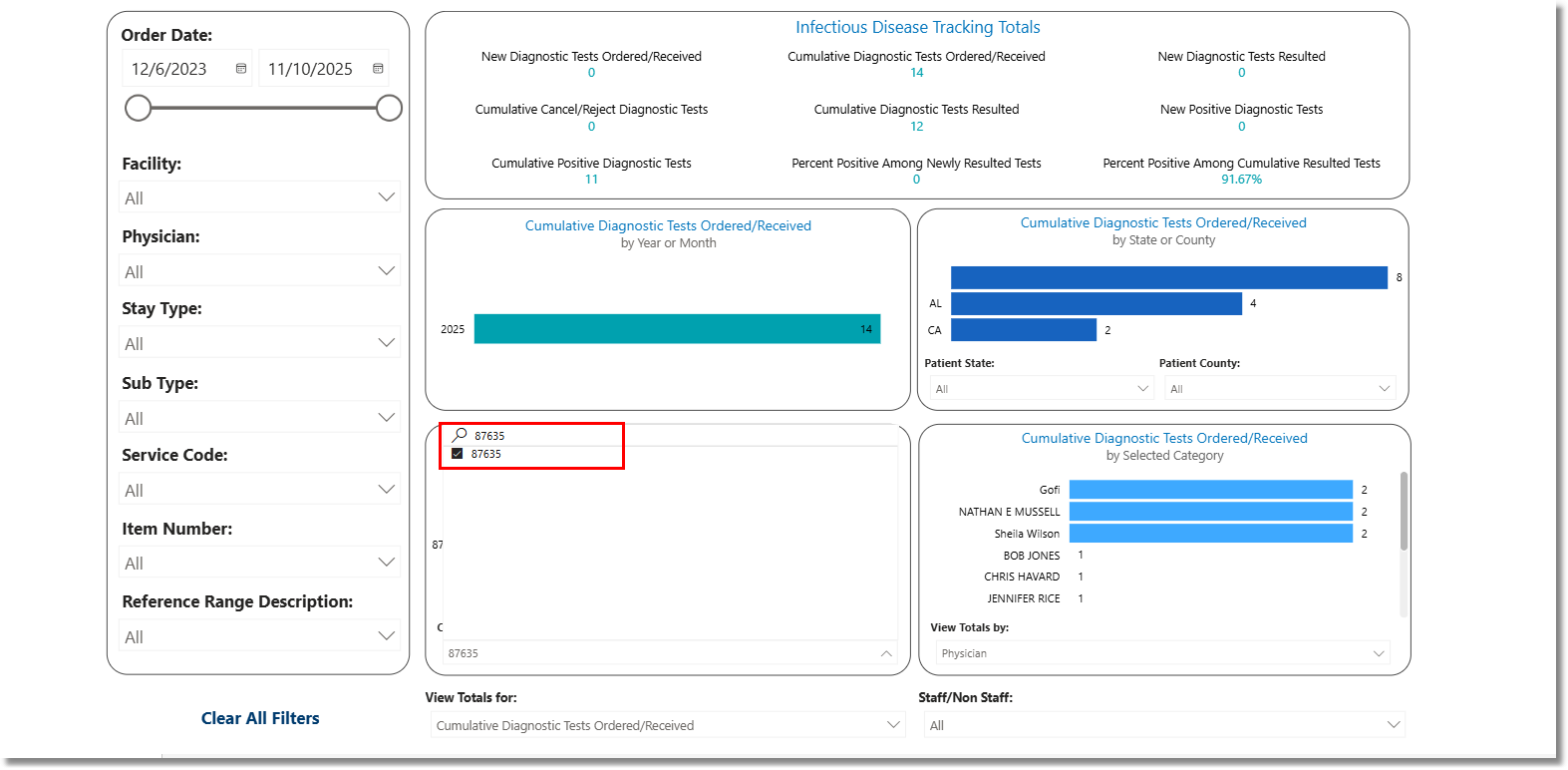
Infectious Disease Tracking - CPT Code Drop-Down
Select Web Client > Report Dashboard > Interactive Reports & Dashboards > Infectious Disease Tracking > CPT Code Drop-Down > Deselect CPT Code 87635 > Search Field
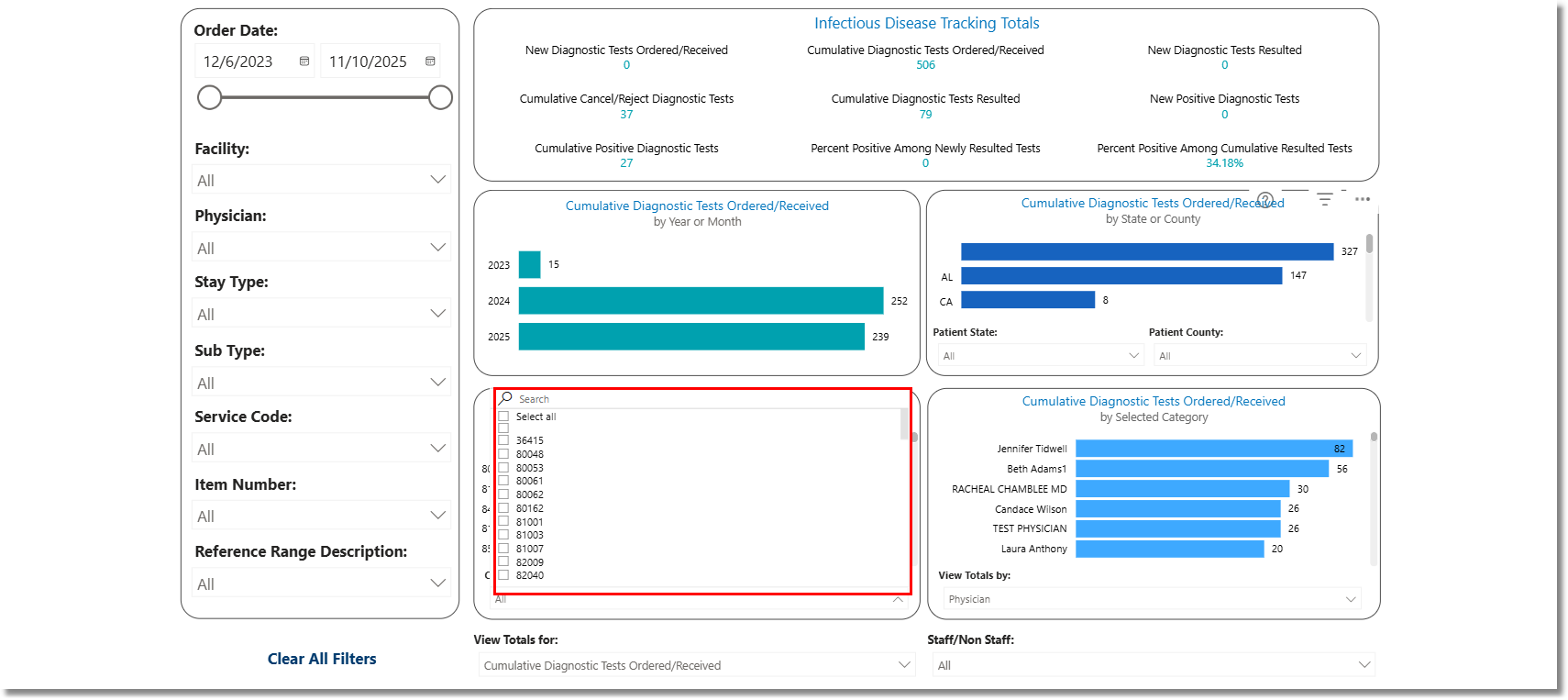
Infectious Disease Tracking - CPT Code Drop-Down