|
<< Click to Display Table of Contents >> Orders Discontinued as an Error |
  
|
|
<< Click to Display Table of Contents >> Orders Discontinued as an Error |
|
The Orders Discontinued as an Error Dashboard provides critical insights into medication errors within the pharmacy setting, supporting efforts to enhance patient safety, improve quality of care, and reduce the occurrence of future errors. The dashboard displays the total number of pharmacy orders flagged with a Stop Code of “E,” indicating a discontinued order. Data can be analyzed by Entered Initials, Stay Type, Physician, Service Code, Sub Type, Administration Route, and Medication Item. Additionally, error trends are displayed in monthly, weekly, and daily intervals to support timely identification and corrective action.
Select Web Client > Report Dashboard > Interactive Reports & Dashboards > Orders Discontinued as an Error
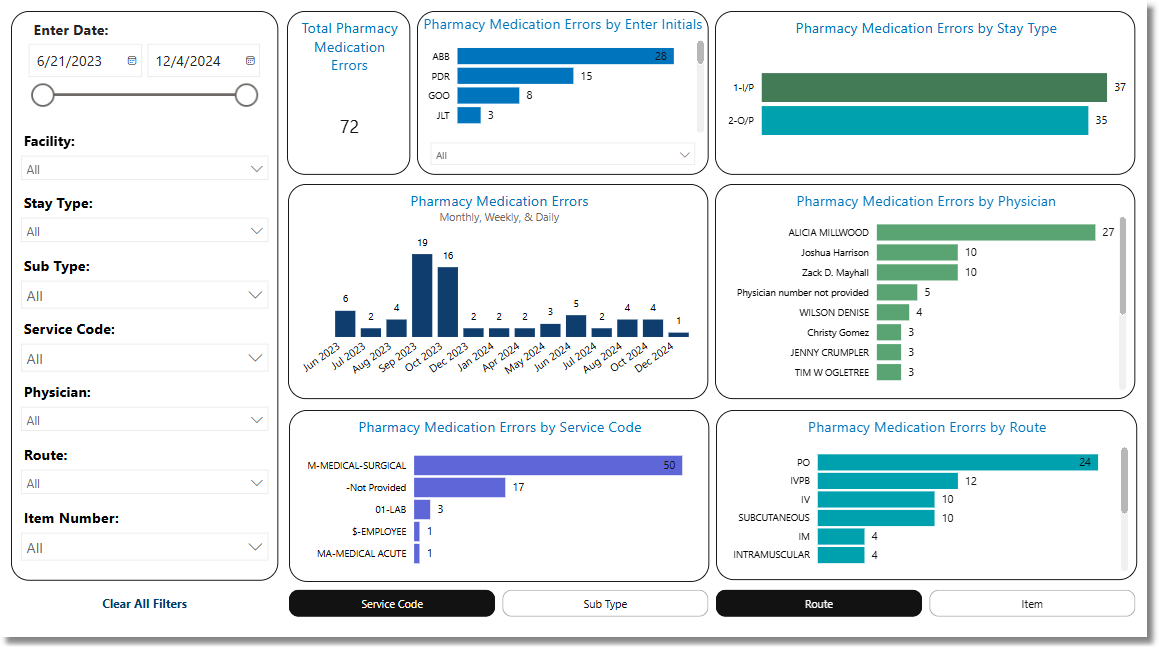
Orders Discontinued as an Error
Metrics
•Total Orders Discontinued as an Error: The number of Pharmacy Orders in which the Stop Code is "E".
Filters
Filters can be applied to refine the dashlet totals. Each filter features a drop-down menu with a built-in search field, allowing for efficient selection of specific criteria.
•Enter Date: Use the calendar or slider to specify the Enter Date range to be used.
•Facility: Use the drop-down menu to select a specific facility.
•Stay Type: Use the drop-down menu to select a specific Stay Type.
•Sub Type: Use the drop-down menu to select a specific Sub Type.
•Service Code: Use the drop-down menu to select a specific Service Code.
•Physician: Use the drop-down menu to select a specific physician.
•Route: Use the drop-down menu to select a specific administration route.
•Item Number: Use the drop-down menu to select a specific item number.
•Clear All Filters: Select this option to clear all previously applied filters.
NOTE: If no filters are selected, the data will populate using the default setting of All.
Slicers
The following slicers are available to further refine the corresponding dashlets:
•Service Code
•Sub Type
•Route
•Item