|
<< Click to Display Table of Contents >> Allergy Severity |
  
|
|
<< Click to Display Table of Contents >> Allergy Severity |
|
The Allergy Severity table creates a crosswalk to convert existing Allergy Severities (Minor, Normal, Major) to standard Allergy Severities (Mild, Mild to Moderate, Moderate, Moderate to Severe, Severe, and Fatal).
NOTE: This table may only be updated one time. After Save is selected, all fields will be disabled.
Select Web Client > Tables > Clinical > Nursing category > Allergy Severity
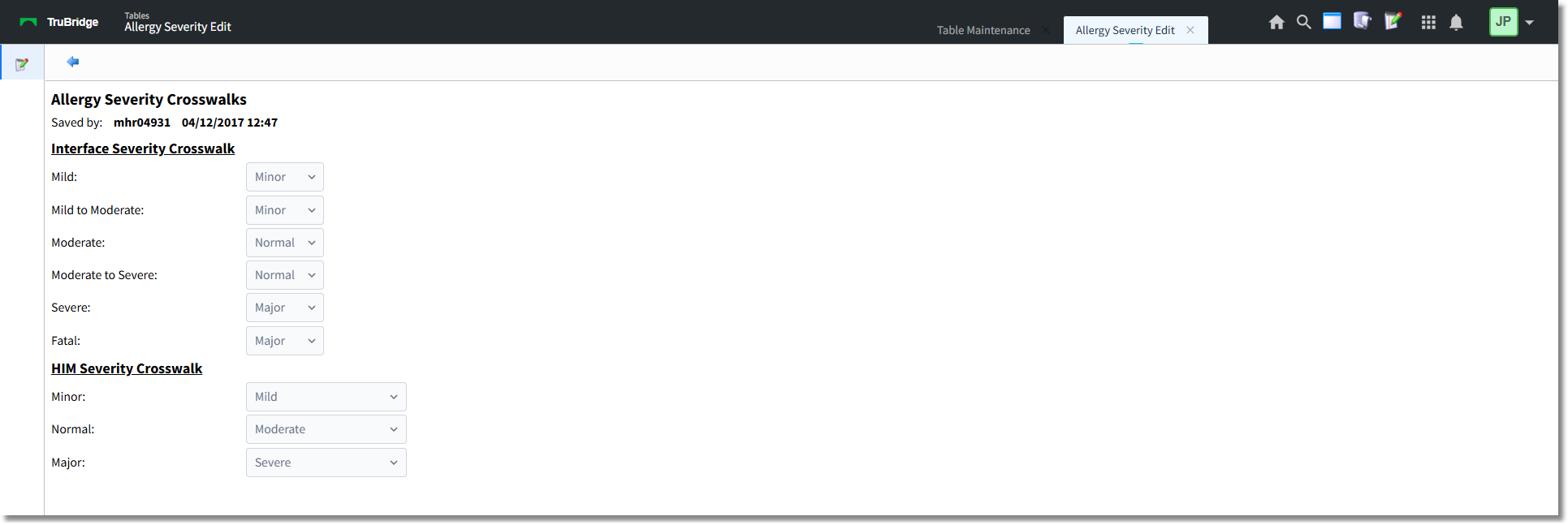
Allergy Severity Crosswalk
In the Interface Severity Crosswalk section, select the drop-down for each of the standard severities (Mild, Mild to Moderate, Moderate, Moderate to Severe, Severe, and Fatal) and map to the existing severities (Minor, Normal, Major).
NOTE: The crosswalk is used for interface transmission purposes. The crosswalk must be completed in order to save a new severity or edit an existing severity on an allergy reaction.
In the HIM Severity Crosswalk section, select the drop-down and map the new severities to existing severities. A new severity must be selected for each existing severity.
Select Save.
The TruBridge EHR will record and display the Employee UBL and the date and time the table entries were saved.