|
<< Click to Display Table of Contents >> Clinical Deficiency Report |
  
|
|
<< Click to Display Table of Contents >> Clinical Deficiency Report |
|
This table provides the ability to automatically print the Clinical Deficiency Report. The report can be set to print for selected patient stay types and/or selected nursing stations.
Select Tables > Clinical > Pharmacy Report Control category > Clinical Deficiency Report
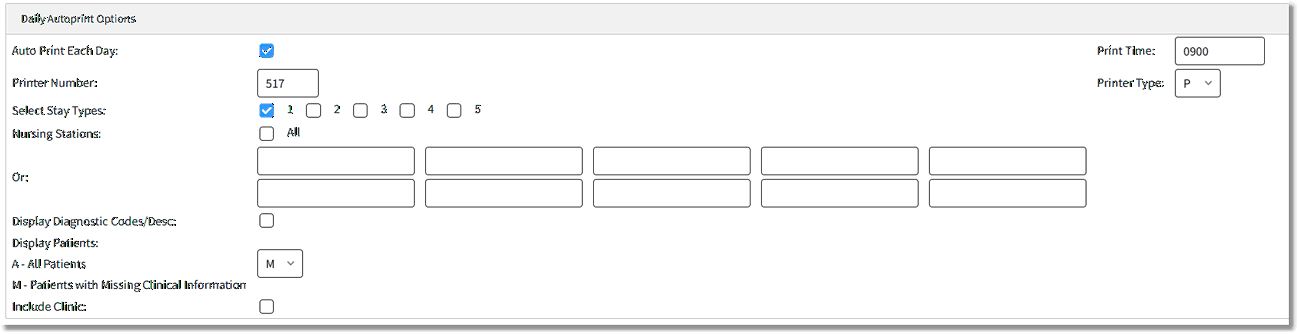
Clinical Deficiency Report Options
•Auto Print Each Day / Print Time
▪Default: Blank, or no entry
▪Options: Y (yes), ✓ (check mark), or N (no)
▪Usage: Selecting the check box will set the report to automatically print. After selecting the check box, enter the desired time for the report to print in the Print Time field, using military format.
NOTE: Reports can only be set to print at the top of the hour.
•Printer Number / Printer Type
▪Default: Blank, or no entry
▪Options: 3-digit printer number and printer type code
▪Usage: Used to enter the printer number and type of printer to which the report will be sent. Selecting the printer type ensures the report is sent in the correct format. Printer types are as follows:
oM - Okidata 320p or Turbo
oE - Okidata 395
oP - Lexmark Laser
•Select Stay Types
▪Default: Blank, or no entry
▪Options: Y (yes), ✓ (check mark), or N (no)
▪Usage: Designates the stay types for which the report will print. One or more stay types can be selected.
• Nursing Stations
▪Default: Blank, or no entry
▪Options: Y (yes), ✓ (check mark), or N (no) or entry of select nursing departments.
▪Usage: Select All to print the report for ALL nursing stations, or leave the check box deselected and enter up to ten nursing stations.
•Display Diagnosis Codes / Desc
▪Default: Blank, or no entry
▪Options: Y (yes), ✓ (check mark), or N (no)
▪Usage: Allows patient’s diagnosis to print to the report.
•Display Patients
▪Default: A - All Patients
▪Options: A - All patients or M - Patients with Missing Clinical Information
▪Usage: Controls whether the report prints for all patients or only those missing height, weight, or allergies.
•Include Clinic
▪Default: Blank, or no entry
▪Options: Y (yes), ✓ (check mark), or N (no)
▪Usage: Allows the report to include clinic patients.