|
<< Click to Display Table of Contents >> Clinical Monitoring |
  
|
|
<< Click to Display Table of Contents >> Clinical Monitoring |
|
The ChartLink Clinical Monitoring table is located under the Physician Application header in the Clinical tab of Table Maintenance. These fields will control the settings for Clinical Monitoring in CPOE and Updated CPOE.
Select Web Client > Tables > Clinical > Physician Application > Clinical Monitoring
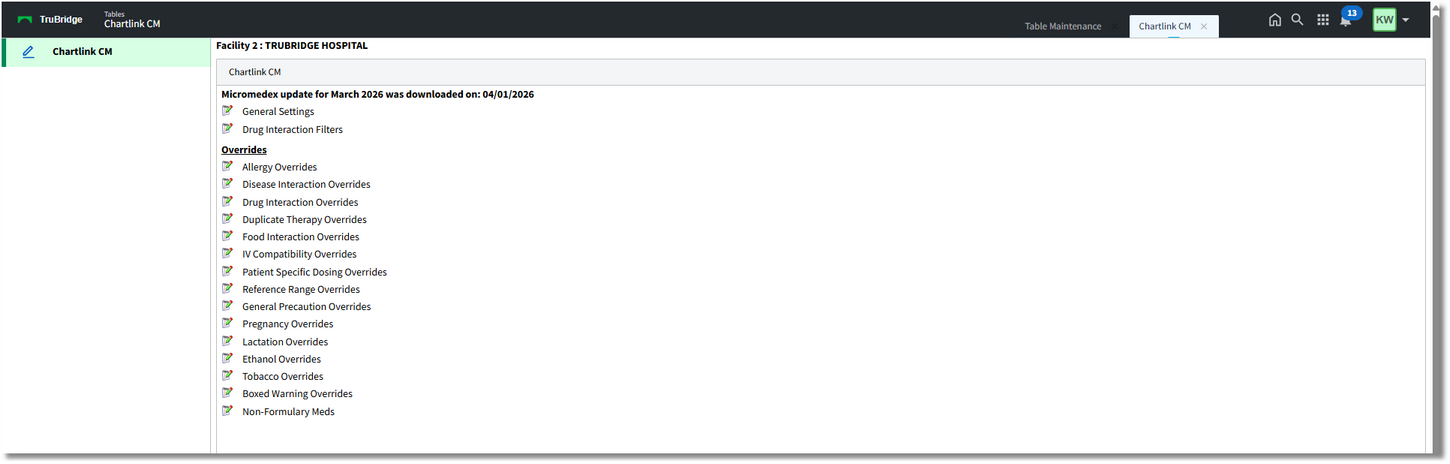
Chartlink Clinical Monitoring
•Micromedex update for ______ was downloaded on: MM/DD/YYYY: Indicates the last date clinical monitoring files were updated.
•General Settings: Contains the clinical monitoring option settings
•Drug Interaction Filters: Contains the drug interaction filtering option settings
•Overrides: Lists override reasons for each clinical monitoring category