|
<< Click to Display Table of Contents >> Discontinue Reasons |
  
|
|
<< Click to Display Table of Contents >> Discontinue Reasons |
|
The Discontinue Reasons table is available for setting up a default list of discontinuing home medications during a discharge reconciliation. These may be set up on a site basis but typically include common reasons for discontinuing a home medication. From within the Medication Reconciliation/Prescription Entry applications, the users will have the ability to enter an OTHER reason if none of the listed DC Reasons are sufficient.
Select Web Client > Tables > Clinical > Discontinue Reasons
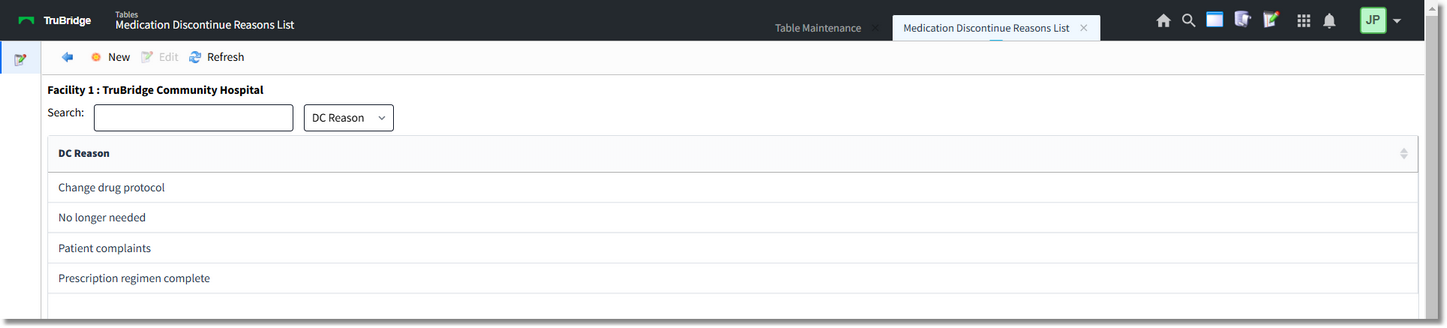
Discontinue Reasons
The blue back arrow returns to the main Clinical page.
The New option will add a new DC Reason to the list.
The Edit option will allow for the editing of an existing DC Reason.
The Refresh option will refresh the screen once changes have been made.
To add a new Description:
Select Web Client > Tables > Clinical > Discontinue Reasons > New

Discontinue Reason Description
In the DC Reason Description field, a discontinue reason of up to 60 characters long may be entered.
The blue back arrow will return to the main Clinical screen.
The Show Shared option will highlight any fields that are sharing the same profile with another facility (multi-facility).
The Print option generates a PDF copy of the table along with current settings/selections.
Save will save any changes made to the table.
Refresh will wipe out any changes made in the field prior to saving.