|
<< Click to Display Table of Contents >> Drug Interaction Filters |
  
|
|
<< Click to Display Table of Contents >> Drug Interaction Filters |
|
Interaction Filtering allows Drug Interaction warnings to be customized in terms of speed of onset, interaction severity, and the quality and quantity of medical literature available regarding an interaction.
Select Web Client > Tables > Clinical > Prescription Entry > Clinical Monitoring > Drug Interaction Filters
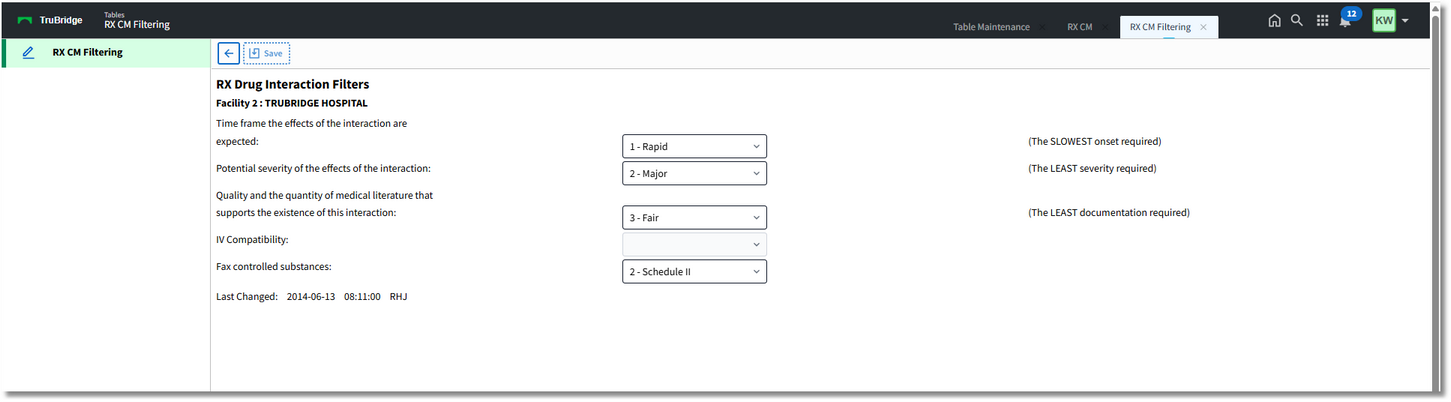
RX Drug Interaction Filters
•Time frame the effects of the interaction are expected: Select the slowest onset required to trigger a warning from the following options:
▪1 - Rapid
▪2 - Delayed
•Potential severity of the effects of the interaction: Select the least severity required to trigger a warning from the following options:
▪1 - Contraindicated
▪2 - Major
▪3 - Moderate
▪4 - Minor
•Quality and the quantity of medical literature that supports the existence of this interaction: Select the least documentation required to trigger a warning from the following options:
▪1 - Excellent
▪2 - Good
▪3 - Fair
▪4 - Poor
•IV Compatibility: IV compatibility filtering is not used during prescription entry clinical monitoring.
•Fax controlled substances: Choose from the following options the highest schedule of controlled substances to fax to a receiving pharmacy, or to disallow faxing of controlled substances. The setting should be made based on state guidelines.
▪1 - Schedule I: All schedules of controlled substances and non-scheduled drugs can be faxed.
▪2 - Schedule II: Drugs in Schedules II through V, and non-scheduled drugs, can be faxed.
▪3 - Schedule III: Controlled substances in Schedules III, IV and V drugs, as well as non-scheduled drugs, can be faxed.
▪4 - Schedule IV: Drugs in Schedules IV, V and non-scheduled drugs can be faxed.
▪5 - Schedule V: Drugs in Schedule V and non-scheduled drugs can be faxed.
▪n/a: Do not fax controlled substances.
NOTE: When prescribing multiple new medications, if one or more do not fall into the class as defined in the field above, none of them will be faxable.
•Last Changed: This field indicates the last date and time (in YYYY-MM-DD HH:MM:SS format) that the Fax controlled substances field was changed, along with the initials of the employee who made the changes.
•Save: Once any changes are made, be sure to select Save from the action bar.
•Back Arrow: To return to the previous screen, select this option from the action bar.