|
<< Click to Display Table of Contents >> Overrides |
  
|
|
<< Click to Display Table of Contents >> Overrides |
|
Override reasons may be created for each type of clinical monitoring check. A maximum of 10 override reasons may be entered for each of the following categories: Allergies, Disease Interactions, Drug Interactions, Duplicate Therapy, Food Interactions, General Precautions, Pregnancy, Lactation, Ethanol, Tobacco, and Boxed Warning.
Please note that each override table setup will be the same, no matter which category is selected.
Select Web Client > Tables > Clinical > Prescription Entry > Clinical Monitoring > Overrides
RX CM Overrides
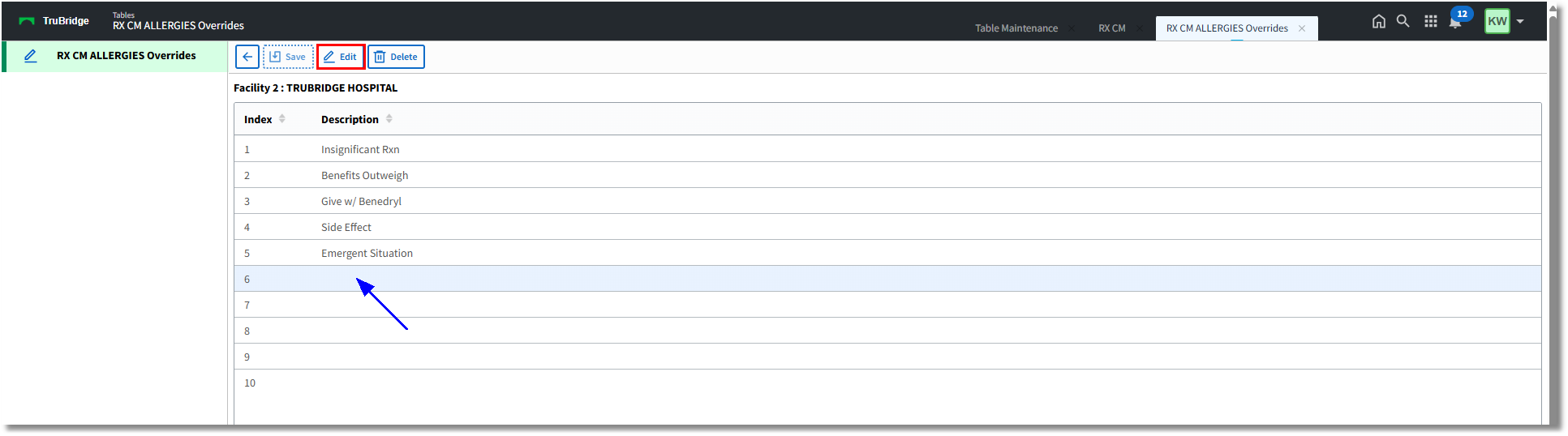
• Back Arrow: Select to return to the previous screen.
•Save: To save any changes, select this from the action bar.
•Edit: To enter override reasons, select an entry from the list and select this option from the action bar.
•Delete: To delete an override reason, select an entry from the list and select this option from the action bar.
To Add or Edit an Entry
1.To add a new entry, select a blank line and select Edit (or double-click).
or
To edit an existing entry, select the entry and select Edit (or double-click).
2.Enter the override reason in the field. This field accepts a maximum of 20 characters.
3.Select OK.

RX CM Overrides: Input Prompt
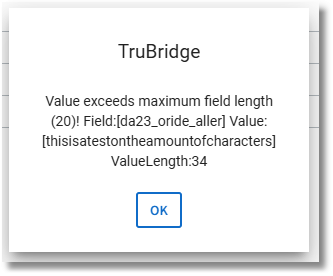
NOTE: If more than 20 characters are entered for an override reason, when Save is selected, the following prompt will display. Select OK to close the prompt; then edit the reason to shorten it as necessary so it can be saved.