|
<< Click to Display Table of Contents >> EMAR Settings Table |
  
|
|
<< Click to Display Table of Contents >> EMAR Settings Table |
|
The EMAR Settings Table is used to customize the EMAR display as it relates to date and time.
Select Web Client > Tables > Clinical > Nursing category > EMAR Settings Table
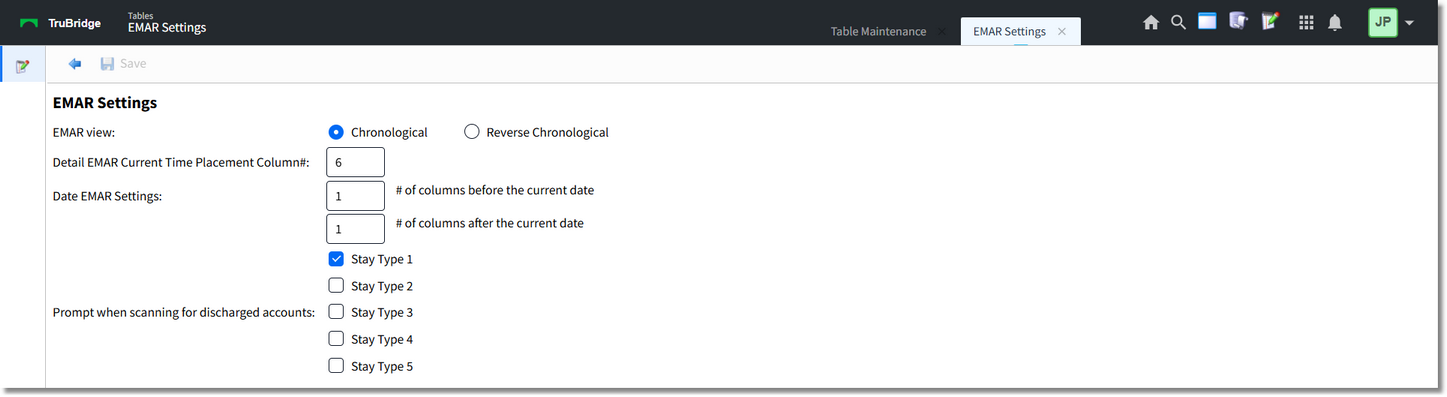
EMAR Settings
•EMAR View: This option determines the EMAR date/time review order. Select Chronological or Reverse Chronological.
•Detail EMAR Current Time Placement Column#: This field allows for a 2-character numeric entry that defines the column number where the current medication entry line should appear.
•Date EMAR Settings: These fields allow for a 2-character numeric entry that determines the number of columns that will display before the current date and after the current date.
•Prompt when scanning for discharged accounts: When a patient's wristband is scanned via MedVerify, a prompt will display that the patient has been discharged if the stay type of the patient matches a Stay Type selected in this table.
▪Stay Type 1
▪Stay Type 2
▪Stay Type 3
▪Stay Type 4
▪Stay Type 5
•After setup is complete, the following options are available:
▪Back Arrow: Select this option to return to the previous screen. If a change has been made but not saved the following prompt will display: Are you sure you wish to exit without saving? Select Yes or No.
▪Save: Select this option to save modifications.