|
<< Click to Display Table of Contents >> EMAR Colors Table |
  
|
|
<< Click to Display Table of Contents >> EMAR Colors Table |
|
The EMAR Colors Table is used to customize the colors that display for the different medication types viewable on the Electronic MAR.
Select Web Client > Tables > Clinical > Nursing category > EMAR Colors Table
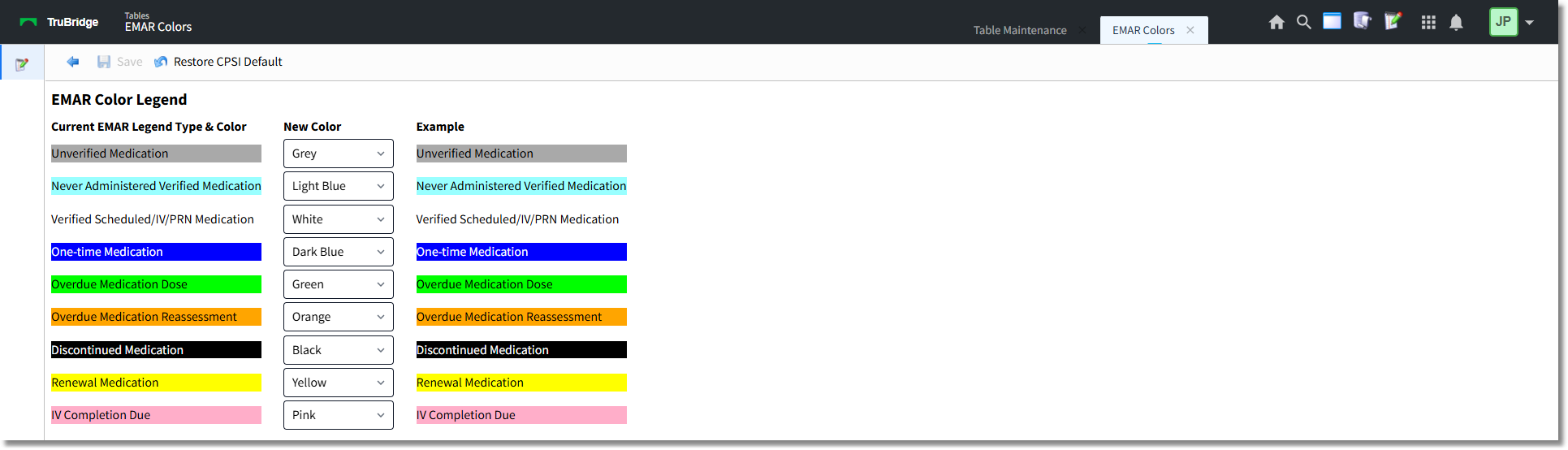
EMAR Color Legend
•Current EMAR Legend Type and Color: This column displays the medication types and their corresponding colors as they are currently displaying on the MAR. The following denotes the system default color scheme:
▪Unverified Medication: Grey
▪Never Administered Verified Medication: Light Blue
▪Verified Scheduled/IV/PRN Medications: White
▪One-time Medications: Dark Blue
▪Overdue Medication Dose: Green
▪Overdue Medication Response/Reaction: Orange
▪Discontinued Medication: Black
▪Renewal Medication: Yellow
▪IV Completion Due: Pink
•New Color: To modify the color displayed for a medication type, select the applicable color from the drop-down menu. Colors may be used more than once. Available colors include:
▪Black
▪Dark Blue
▪Green
▪Grey
▪Light Blue
▪Orange
▪Red
▪White
▪Yellow
▪Pink
•Example: This column displays the medication types as they will appear on the EMAR based on the current setup options selected.
•After setup is complete, the following options are available:
▪Back Arrow: Select this option to return to the previous screen. If a change has been made but not saved the following prompt will display: Are you sure you wish to exit without saving? Select Yes or No.
▪Save: Select this option to save modifications.
▪Restore Evident Default: Select this option to return setup to the system default shown in the Current EMAR Legend Type and Color column.
NOTE: If the 'View Only' version of Updated EMAR is being utilized, this table may not be modified. The system default will display via the EMAR.