|
<< Click to Display Table of Contents >> EScribe Approval |
  
|
|
<< Click to Display Table of Contents >> EScribe Approval |
|
The functionality of prescribing controlled substances electronically, which is being mandated by some states, has been added to the TruBridge EHR. Changes have been made to the files sent and received between TruBridge, pharmacies, and authentication screens to accommodate the certification of TruBridge Escribe 2.0 + EPCS. Changes that will affect all users are listed below.
1.When EPCS is not enabled, this table will display as view-only, displaying the physician information and service levels for providers who are set up to send electronic prescriptions. If EPCS is enabled, there will be an additional column displaying the EPCS status as well as an option to check the status of a selected provider and an option labeled "EPCS LAC" (Logical Access Control).
•The option directs the user to the screen where the Active Grant, a step for utilizing EPCS, may be given to providers who are enrolled for EPCS. The authentication will require a System Administrator with access to LAC and a provider who is currently active in EPCS.
•The "EPCS LAC" option will initially be available to any user who has Rule Based Security access to Table Maintenance. A default Deny rule has been included in the software update, entitled "Deny Escribe Logical Access in Table Maintenance" and may be located under the Screen tab in Identity Management. This rule should be added for users who have access to Table Maintenance, but who should not be allowed to access LAC for EPCS.
Select Web Client > Tables > Clinical > Escribe Approval
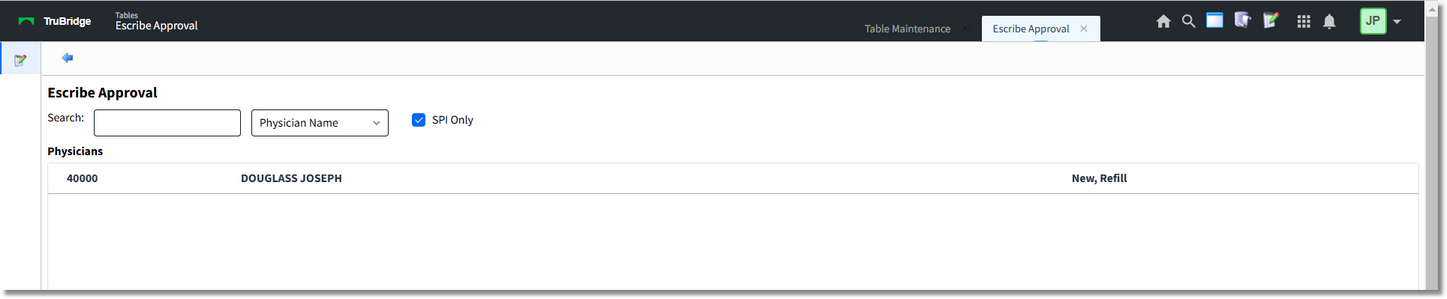
Escribe Approval
2.Once the Active Grant has been given, the user may double-click the provider name in the Escribe Approval table to access the Physician Information - Escribe Data screen (that may also be accessed via page 3 of Physician Security) in order to grant final access to EPCS by selecting the check box for the service level Controlled Substances. The checkbox will only become enabled if all of the preliminary steps for EPCS enrollment have been completed.
Select Web Client > Tables > Clinical > Escribe Approval > double-click Provider name
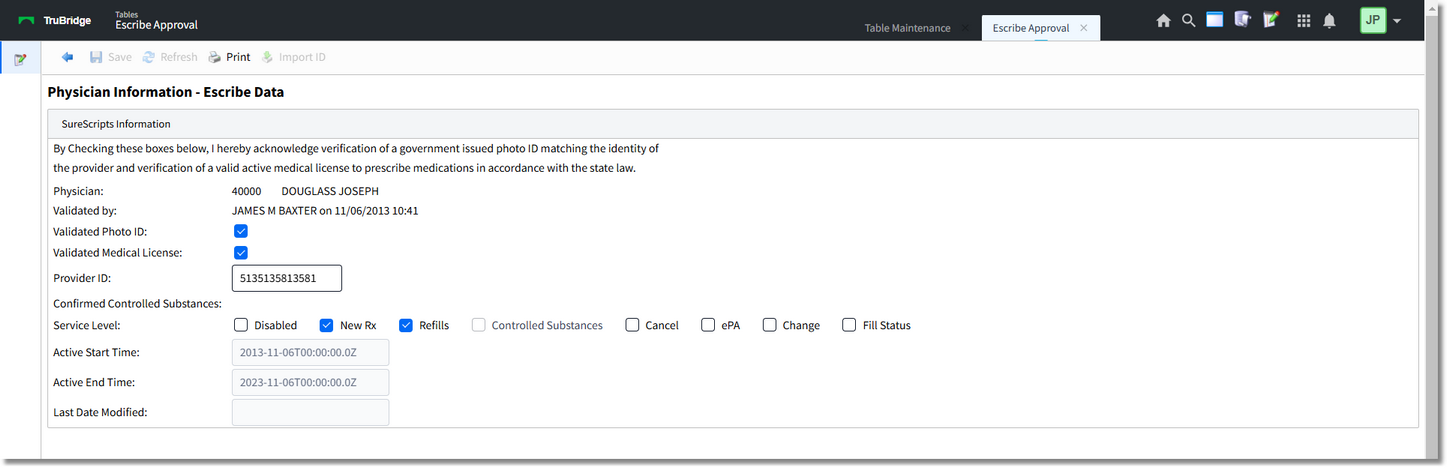
Physician Information - Escribe Data
3. Service levels include:
•New Prescription (Service Level is 1): Allows prescriber to create a new prescription for a patient.
•Refills (Service Level is 2): Allows prescriber to address refill requests from patients/pharmacy.
•Cancel (Service Level is 16): Allows prescriber to cancel a pending prescription.
•ePA (Service Level is 128): Electronic Prior Authorization will be available to send an authorization request for medications that require a Prior Authorization.
•Change (Service Level 4): Allows prescriber to edit a pending prescription and resubmit it.
NOTE: Service Level codes are used to determine the messaging capabilities of a prescriber.