|
<< Click to Display Table of Contents >> Pharmacies |
  
|
|
<< Click to Display Table of Contents >> Pharmacies |
|
The Pharmacies table displays a list of pharmacies that accept electronic prescriptions from SureScripts, TruBridge's electronic prescription vendor. Prescriptions may be created and sent electronically through the EScribe application.
Select Web Client > Tables > Clinical > Pharmacies
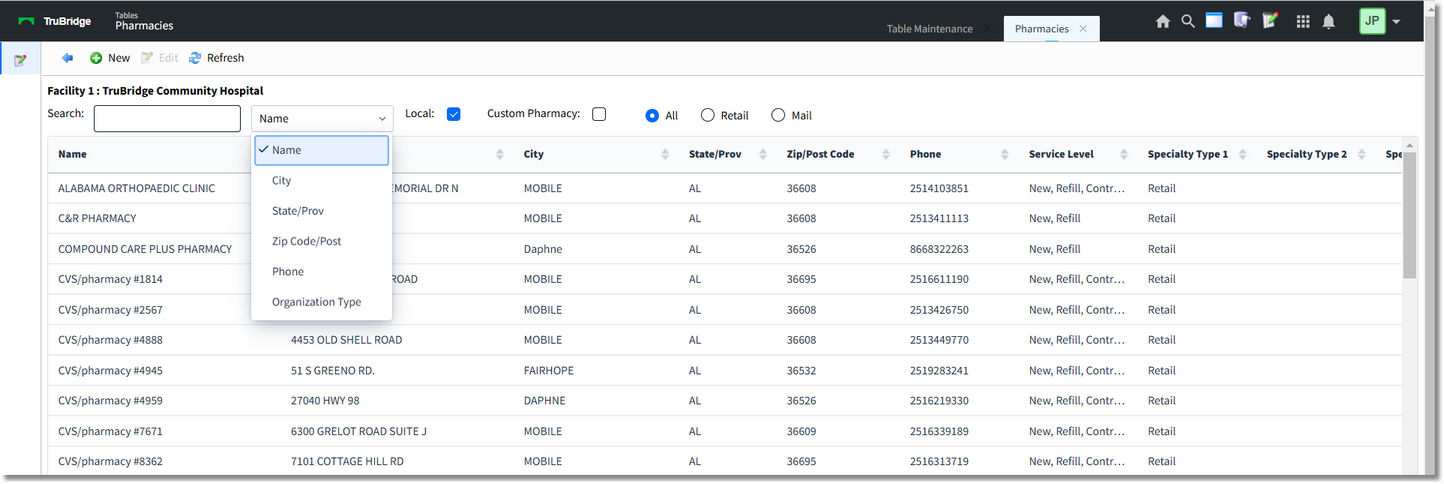
Pharmacies
The Search field may be used to locate a specific pharmacy in the list by Name, City, State, Zip Code, Phone number, or Organization Type.
The Local checkbox indicates that the list will only pull in pharmacies that have a zip code entered in the Zip Codes table, allowing the pharmacies list to generate only local area pharmacies when the checkbox is checked.
The radio buttons indicate whether the list will display All pharmacy Specialty Types, only Retail Specialty Types or only Mail Order Specialty Types.
The Pharmacies list headers display the pharmacy name, address, city, state, zip code, phone number, service level, specialty type one and specialty type 2.
The blue back arrow returns to the main Clinical page.
The New option may be used in the following instances:
1.For sites not using EScribe, the list will be blank. The site may create Custom Pharmacies so that they may fax prescriptions.
2.For sites utilizing the EScribe application, not all pharmacies will be listed in the SureScripts database because not all pharmacies accept electronic prescriptions through SureScripts. If a local pharmacy is not registered with SureScripts, the site may create a Custom pharmacy so that they may fax prescriptions.
The Edit option will allow for the editing of certain fields within the pharmacy's information. Accessibility to these fields is mostly grayed-out so that no information populating from SureScripts may be edited.
NOTE: Facilities outside of the United States utilize a different address format. If a foreign address format is used, the province/territory and postal code show on the Pharmacy Address Table. A TruBridge representative will need to be contacted in order for the foreign address fields to be activated.
The Refresh option will refresh the table screen once changes have been made.
NOTE: This table populates from a script.
NOTE: Surescripts updates this list nightly and a full replacement is done on a weekly basis. Any custom pharmacies added by a facility will not be updated.