|
<< Click to Display Table of Contents >> Units Table |
  
|
|
<< Click to Display Table of Contents >> Units Table |
|
The Units Table was created to cross-reference the pharmacy item master Other Units entries with Unified Code for Units of Measure or UCUM codes. UCUM codes are the standard codes necessary to report immunizations.
The Units Table will be specific to the facility. The hospital formulary units will be loaded automatically into the Units Table and should be matched with the standardized UCUM Code.
Select Web Client > Tables > Clinical > Units Table
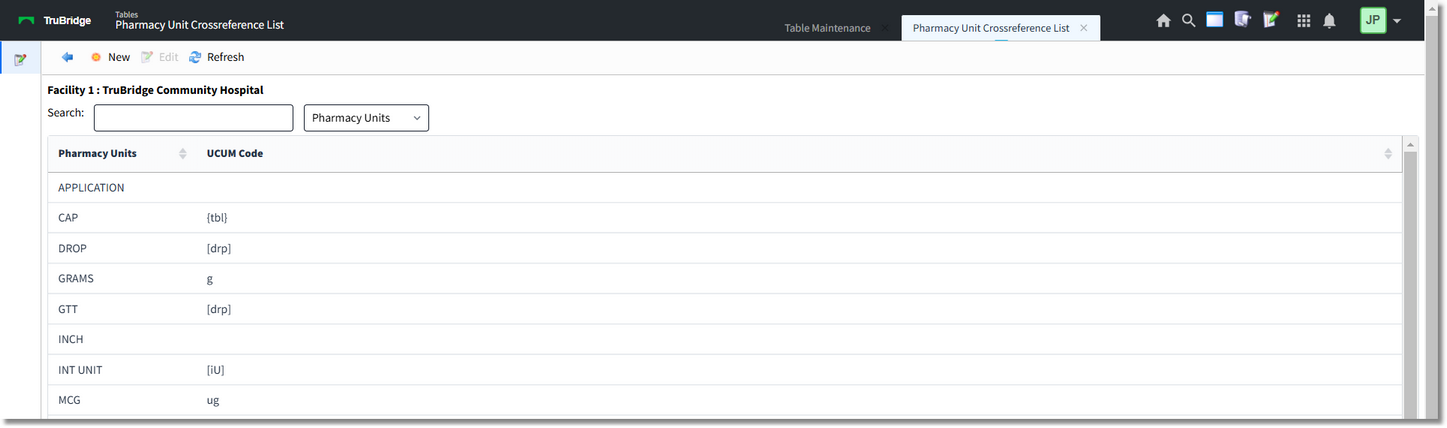
Units Table
1.To enter a new unit, select New or choose an existing unit by selecting Edit or double clicking the unit.

Pharmacy Unit Crossreference List
2.Select the Binoculars icon to access the UCUM list.

Pharmacy UCUM Code List
3.Enter the description of the unit to be referenced. The default search is Description, but may also be changed to Code by using the drop-down search topic to the right of the search window.
4.Double-click to select the UCUM code. The unit is now cross-referenced to the UCUM code.
5.Select Save to save changes made to the table settings.
The following options are also available on the action bar:
•Print: Displays the table settings in Adobe
•Delete: Deletes the table settings
•Refresh: Allows changes to show immediately in the Physicians list
6.Select the back arrow to return to the previous screen.