|
<< Click to Display Table of Contents >> Opioid Diagnosis Trending |
  
|
|
<< Click to Display Table of Contents >> Opioid Diagnosis Trending |
|
The Opioid Diagnosis Trending Dashboard supports the monitoring and analysis of trends related to opioid-related diagnoses within the facility. It provides trend data on a monthly and weekly basis, with breakdowns by Physician, Stay Type, Sub Type, Service Code, and ICD-10 Code. Additionally, the dashboard categorizes data by ICD-10 diagnosis type, including unknown diagnosis, opioid use, opioid abuse, and opioid dependence, enabling targeted tracking and informed decision making for opioid management initiatives.
Select Web Client > Report Dashboard > Interactive Reports & Dashboards > Opioid Diagnosis Trending
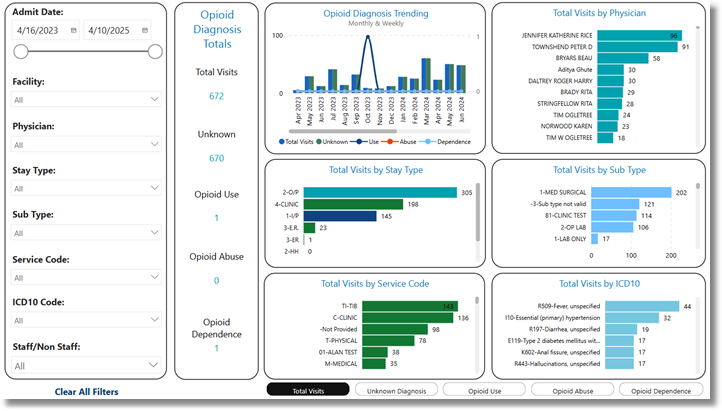
Opioid Diagnosis Trending
Metrics
•Total Visits: Total visits with at least one coded diagnosis.
•Opioid Unknown: Total visits with a coded diagnosis that does not include an opioid related diagnosis.
•Opioid Abuse: Total visits with a coded diagnosis that includes an ICD-10 associated with opioid abuse.
•Opioid Dependence: Total visits with a coded diagnosis that includes an ICD-10 associated with opioid dependence.
Filters
Filters can be applied to refine the dashlet totals. Each filter features a drop-down menu with a built-in search field, allowing for efficient selection of specific criteria.
•Admit Date: Use the calendar or slider to specify an Admit Date range to be used.
•Facility: Use the drop-down menu to select a specific facility.
•Physician: Use the drop-down menu to select a specific physician.
•Stay Type: Use the drop-down menu to select a specific Stay Type.
•Sub Type: Use the drop-down menu to select a specific Sub Type.
•Service Code: Use the drop-down menu to select a specific Service Code.
•ICD10 Code: Use the drop-down menu to select a specific ICD10 Code.
•Staff/Non Staff. Use the drop-down menu to select a staffing preference.
•Clear All Filters: Select this option to clear all previously applied filters.
NOTE: If no filters are selected, the data will populate using the default setting of All.
Slicers
The following slicers are available to further refine the corresponding dashlets:
•Total Visits
•Opioid Use
•Opioid Abuse
•Opioid Dependence
•Non Opioid