|
<< Click to Display Table of Contents >> Physician Documentation Instructions |
  
|
|
<< Click to Display Table of Contents >> Physician Documentation Instructions |
|
Select Web Client > Tables > Clinical > Physician Application > Physician Documentation Instructions
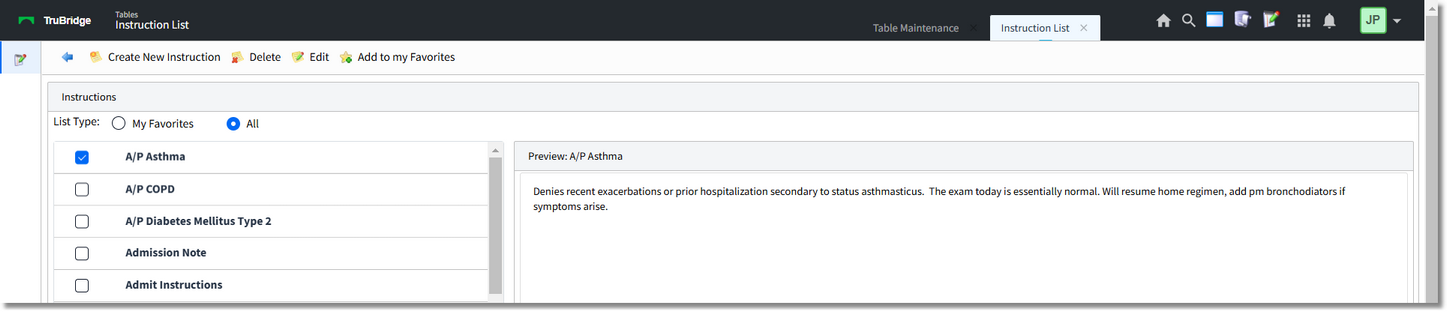
Instructions
•My Favorites: Select this radio button to view the signed on UBL's favorite instructions.
•All: Select this radio button to view a list of all instructions in the table.
•Create New Instruction: Select this option to enter a new instruction into the table.
•Delete: To delete an instruction, select the instruction and then Delete.
•Edit: To edit an instruction, select the Instruction and then Edit.
•Add to my Favorites: Allows an instruction to be listed under My Favorites for the signed on UBL.
•Remove from my Favorites:  Allows an instruction to be removed from My Favorites for the signed on UBL.
Select Web Client > Tables > Clinical > Physician Application > Physician Documentation Instructions > Create New Instruction

Instructions
•Title: Enter the title of the instruction. In the next field enter the instruction text.
Select Save to save the instruction or Cancel to exit the table without saving.
•Cancel: Select to exit the table without saving.