|
<< Click to Display Table of Contents >> Destinations |
  
|
|
<< Click to Display Table of Contents >> Destinations |
|
Destinations are used to denote the point in a patient's stay for which reconciliation is occurring. Destination setup also determines the functionality of the application at each juncture in the patient's stay. The Destinations table is selected to create a facility-defined listing of the Destinations that will display in the drop-down menu in Medication Reconciliation (e.g. Admission, Level of Care Change, and Discharge).
Select Web Client > Tables > Clinical > Medication Reconciliation > Destinations
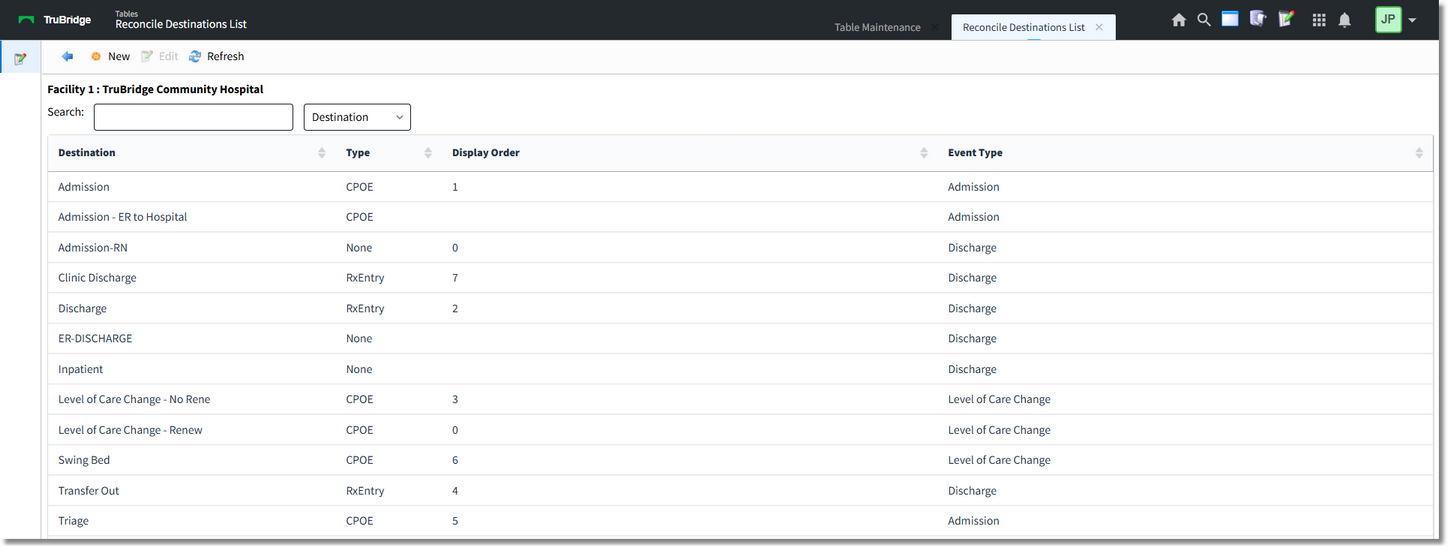
Destinations table
Existing Destinations will display including their Description, Type, Display Order and Event Type. The columns may be sorted by selecting the header.
To modify an existing Destination, select the Destination then Edit. Select Refresh to immediately apply any changes made to the Destination. Select Back Arrow to return to the previous screen.
Select New to create a new Destination.
Select Web Client > Tables > Clinical > Medication Reconciliation > Destinations > New
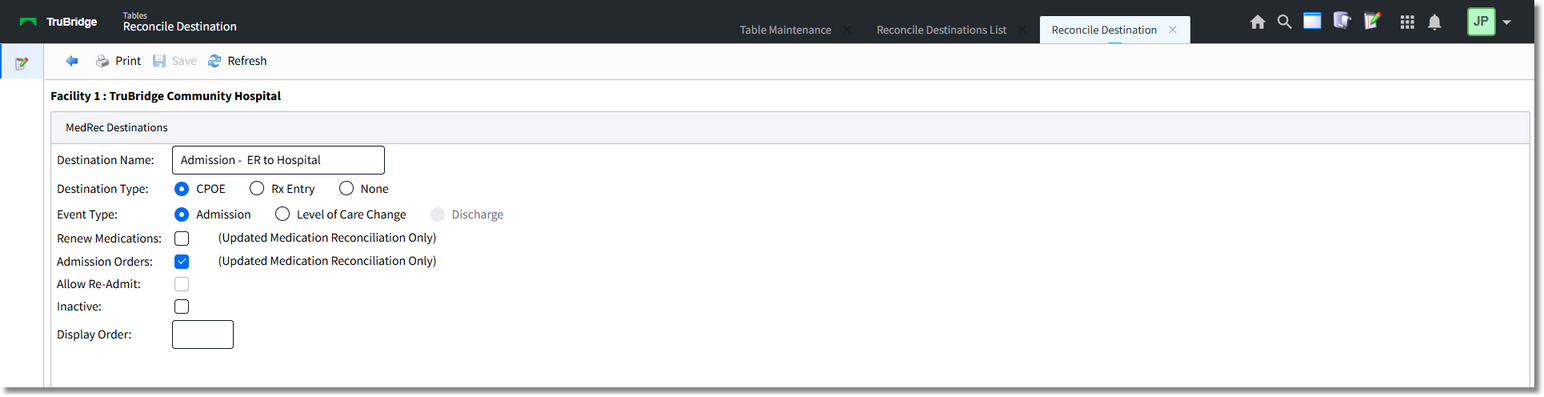
Admission Destination Setup
The following setup options are available:
•Destination Name: This is the description that will display in the Destination drop-down and in the Med Rec History.
•Destination Type: This option determines where the user will be launched upon selecting Reconcile.
▪CPOE: When a reconciliation is performed for this Destination Type, the TruBridge EHR launches Physician Order Entry so that new orders may be placed. CPOE is most commonly associated with Admission Event Types or Level of Care Changes when new orders are needed.
▪Rx Entry: When a reconciliation is performed for this Destination Type, the TruBridge EHR launches Prescription Writer so discharge medications may be documented. Rx Entry is most commonly associated with Discharge Event Types.
▪None: This Destination Type is used when no new orders or prescriptions are needed. None is most commonly associated with Level of Care Change Event Types where the patient changes account numbers.
•Event Type: This option defines how the reconciliation will be counted for Meaningful Use statistics and will also list in the Med Rec History.
•Renew Medications: If selected, this field allows physicians to renew medications in Updated Medication Reconciliation when performing a Level of Care Change. The provider selects Continue Active and is launched into CPOE where medications may be reviewed and signed without having to address each medication. This option is only enabled if the Destination Type is CPOE.
•Admission Orders: When the provider performs an Admission Reconciliation with this option selected, the orders will be flagged as Admission Orders and will have a 'Pending Admit' status. Once the patient is fully admitted, these orders will be automatically released to the verification queues. The Admission Orders option is only enabled if the facility has purchased EDIS and the Destination Type is set to CPOE.
•Allow Re-Admit: This option allows the user to reverse a discharge reconciliation. This is most commonly associated with Discharge Event Types. This field is retroactive, so it can be turned on/off as needed.
•Inactive: Destinations cannot be deleted. However, Destinations that are no longer used should be hidden so they will not display in the Destination drop-down.
•Display Order: Determines the order in which the destination will appear in the Destination drop-down.
After setup is complete, the following options are available:
•Print: Select this option to print setup.
•Save: Select this option to save modifications.
•Refresh: Select this option to apply any changes made to the setup before the system completes an automatic refresh.
•Back Arrow: Select this option to return to the previous screen.