|
<< Click to Display Table of Contents >> Discharge Medication List |
  
|
|
<< Click to Display Table of Contents >> Discharge Medication List |
|
The Discharge Medication List option allows for the configuration of the Discharge Medication List. The Discharge Medication List is designed to be given to the patient at discharge and can be printed from Reports and Attachments.
Select Web Client > Tables > Clinical > Nursing category > Discharge Medication List
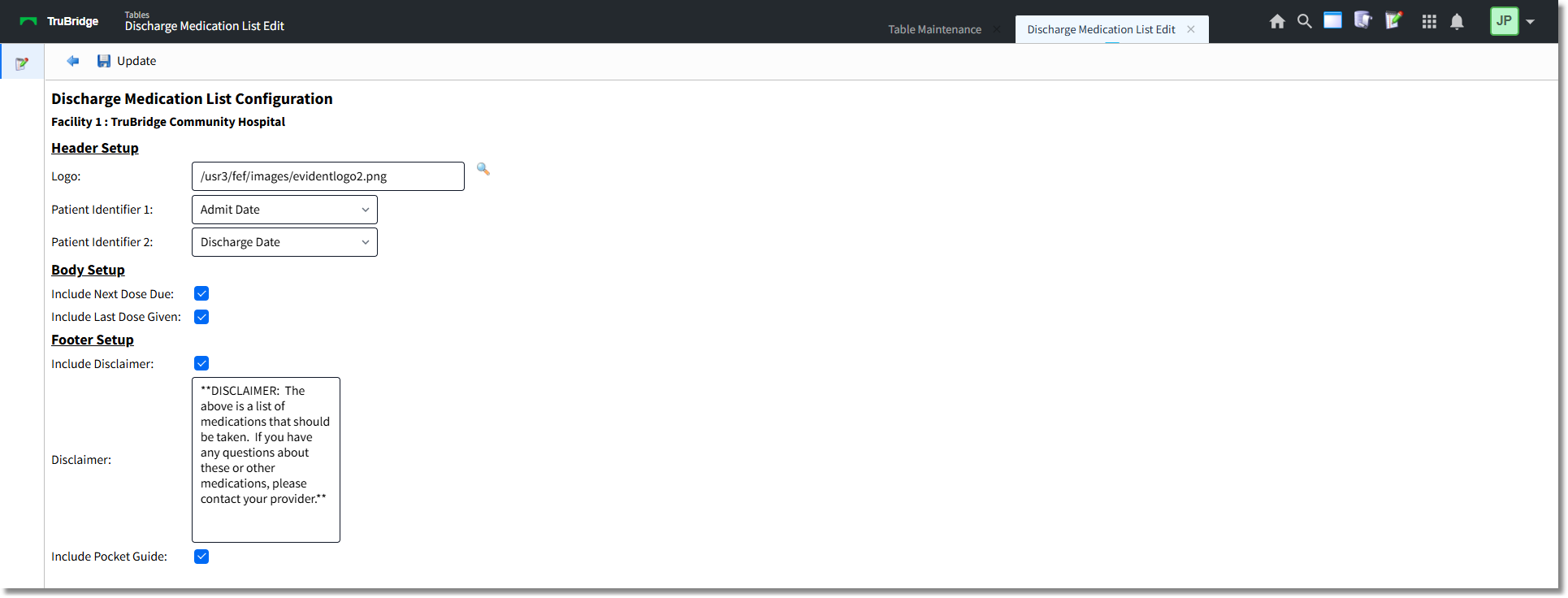
Discharge Medication List Configuration
1.Complete the Header Setup, Body Setup, and Footer Setup sections as follows.
Header Setup
•In the Logo field, use the Lookup icon to search for and select the facility logo for the Discharge Medication List.
•By default, the Discharge Medication List will display the patient name, account number, and date of birth. The configuration allows for two additional patient identifiers:
oIn the Patient Identifier 1 field, select either Admit Date or Medical Record Number.
oIn the Patient Identifier 2 field, select either Discharge Date or Medical Record Number.
Body Setup
•The Include Next Dose Due check box is selected (checked) by default. When this check box is selected, the next dose due will display if entered on the active prescription in Prescription Entry. Deselect (uncheck) the check box if the next dose due should not display on the Discharge Medication List.
•The Include Last Dose Given check box is selected (checked) by default. When this check box is selected, the last dose given will display if entered on the active prescription in Prescription Entry. Deselect (uncheck) the check box if the last dose given should not display on the Discharge Medication List.
Footer Setup
•The Include Disclaimer check box is selected (checked) by default. When this check box is selected, the text entered in the Disclaimer box will display on the Discharge Medication List. Deselect (uncheck) the check box if the disclaimer text should not appear on the Discharge Medication List.
•In the Disclaimer box, the following text displays by default: **DISCLAIMER: The above is a list of medications that should be taken. If you have any questions, please contact your provider.** This text will display on the Discharge Medication List in the Disclaimer section. Edit the text as needed.
•The Include Pocket Guide check box is selected (checked) by default. When selected, a pocket guide will print at the end of the Discharge Medication List. This is an abbreviated version of the Discharge Medication List that the patient can carry with them. This only includes the medication and Sig line information. Deselect (uncheck) the check box to not include the pocket guide on the Discharge Medication List.
2.Select Update to save the changes.