|
<< Click to Display Table of Contents >> Document Maintenance |
  
|
|
<< Click to Display Table of Contents >> Document Maintenance |
|
To perform maintenance on an existing document select Document Maintenance.
Select Web Client > Tables > Clinical > Patient Education Maintenance > Document Maintenance
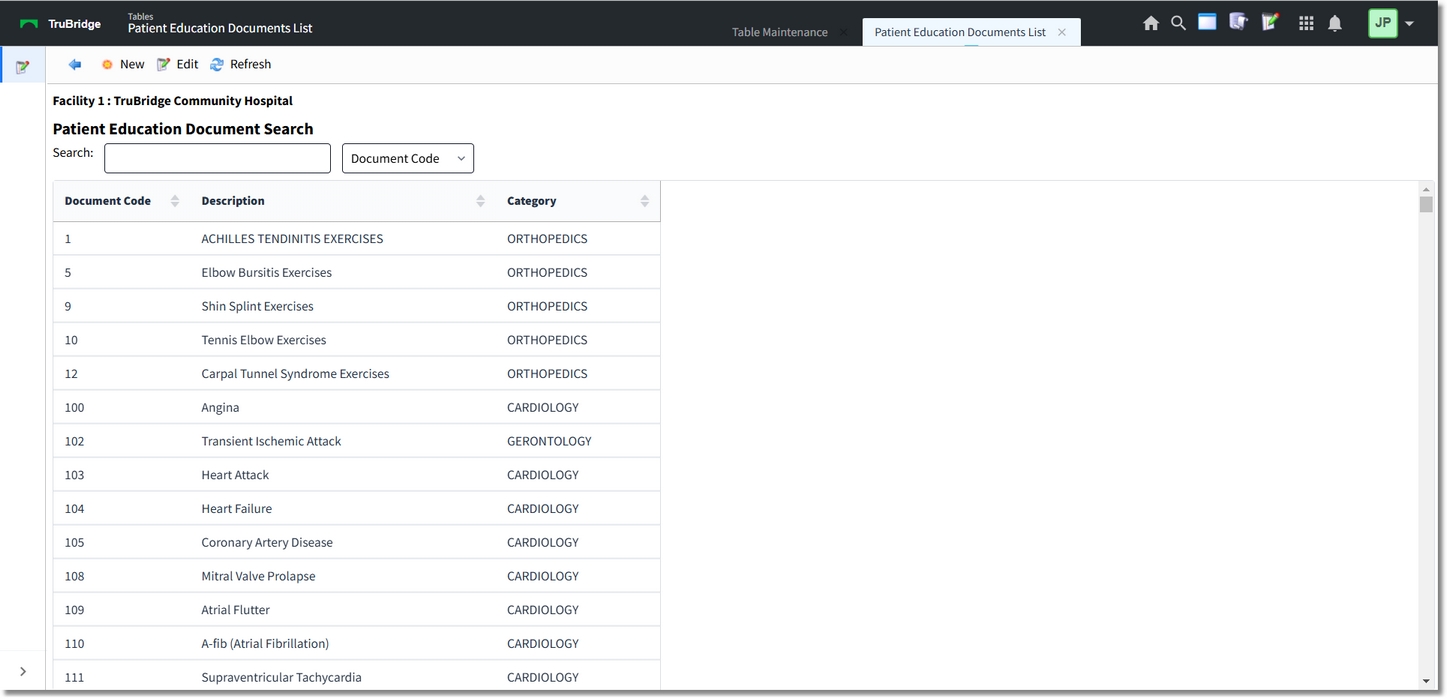
Document Maintenance
The table displays the following information:
•Document Code: Displays the topic code of up to six digits
•Description: Displays the topic description
•Category: Displays the category to which the topic is assigned
The default listing of topics is numerical by Document Code. A search may be performed using one of the three available drop-down searches: Document Code, Description or Category. Key the search term in the search field, then select the search type from the drop-down menu to sort the list. The list may also be sorted by selecting a column header. Use the vertical scroll-bar to view the entire display list.
The following actions are available:
•Blue Back Arrow: Select this option to return to the previous menu.
•New: Select this option to create a custom document. See Create a New Document for setup options.
•Edit: Select this option to modify an existing document. See Editing an Existing Document.
•Refresh: Select this option to manually update the selection list if a documented is created or edited.