|
<< Click to Display Table of Contents >> Frequencies - IV |
  
|
|
<< Click to Display Table of Contents >> Frequencies - IV |
|
The Frequency Table sets standard administration times for frequency codes entered in Frequency of IV Order Entry. Standard administration times display on the following:
•Pharmacy Labels
•IV Active Order List
•Active Order List
•EMAR
Select Web Client > Tables > Clinical > Frequencies - IV
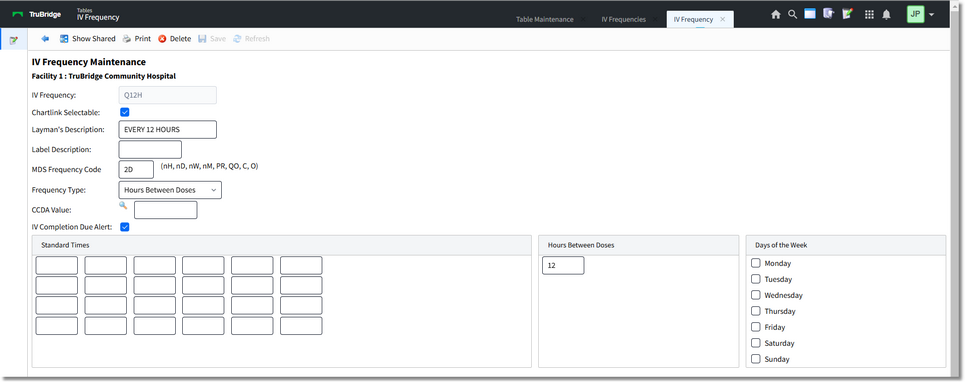
IV Frequency Maintenance
•IV Frequency
▪Default: Blank
▪Options: Up to a 20-character frequency code.
▪Usage: Describes the frequency. The frequency may be selected by description from a lookup display during time of order entry.
•Chartlink Selectable
▪Default: Blank
▪Options: √ (yes) or Blank (no)
▪Usage: Allows the frequency to be selectable from a drop-down box in the CPOE application.
•Layman's Description
▪Default: Blank
▪Options: Up to a 20-character Layman's term.
▪Usage: Was traditionally used with the Discharge Summary and Instructions application in the Point of Care application. Converted the frequency to Layman's Terms in the medication section of the Discharge Instructions Report. However, the TruBridge EHR will now use the Layman term set up in the Prescription Entry Frequency crosswalk table.
•Label Description
▪Default: Blank
▪Options: Up to a 10-character label description.
▪Usage: Allows a frequency description different than the one entered during order entry to print to the label. The description prints to the label ONLY and does not affect printed reports.
•MDS Frequency Code
▪Default: Blank
▪Options: Two character MDS (Minimum Data Set) frequency code.
▪Usage: Used for facilities using the RAI application.
•Frequency Type:
•Standard Times
▪Default: Blank
▪Options: Administration times entered in military format.
▪Usage: Up to 24 times may be entered.
•Hours Between Doses
▪Default: Blank
▪Options: Enter the number of hours between doses.
▪Usage: The system will calculate administration times based on the start time of the order.
•Days of the Week
▪Default: Blank
▪Options: Choose some or all days of the week.
▪Usage: Administration time for the selected day(s) is based on the start time of the order.
•CCDA Value
▪Default: Blank
▪Options: Enter a value or select the CCDA Value lookup to associate a CCDA Value with the Frequency.
▪Usage: For Promoting Interoperability certification (Clinical Information Reconciliation). The system will check for a medication frequency value of an imported CCD to determine if a medication frequency will be imported.
NOTE: Each CCDA Value code may only be associated with one frequency.
•IV Completion Due Alert
▪Default: √ (Yes)
▪Options: √ (yes) or Blank (no)
▪Usage: Alert nursing (via a color change within the MAR) to document either a completion or bag change based on calculated completion from start time.