|
<< Click to Display Table of Contents >> Label Control |
  
|
|
<< Click to Display Table of Contents >> Label Control |
|
This table controls the printer to which Non-IV labels and IV labels print, label sizes, and the number of default labels to print during order entry. This also contains the Label programs that control the printing of Non-IV and IV labels.
Select Tables > Clinical >Pharmacy Report Control category > Label Control
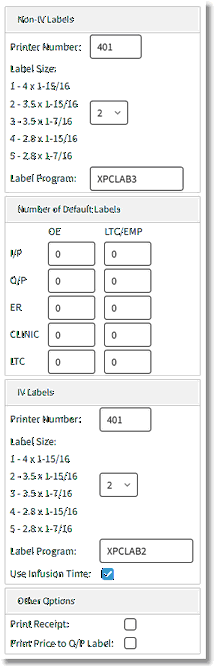
Label Control Table
Non-IV Labels
•Printer Number
▪Default: Blank, or no entry
▪Options: 3-digit printer number or S-Station Printer
▪Usage: Used to enter the printer number to which the Non-IV labels will be sent. TruBridge Consulting Representatives enter this information during the installation process.
•Label Size
▪Default: Blank, or no entry
▪Options: 1-5
▪Usage: Using the legend provided, enter the corresponding number of the desired label size. If the same printer is being used for Non-IV labels and IV labels, then the same label size must be listed in both sections.
•Label Program (for Non-IV labels)
▪Default: Blank, or no entry
▪Options: Executable provided by TruBridge.
▪Usage: This field should never be accessed. TruBridge Consulting Representatives enter this information during the installation process.
•Number of Default Labels
▪Default: Blank, or no entry
▪Options: Numeric value entry
▪Usage: Determines the number of labels to print by default during order entry and for LTC/Employee prescriptions for each stay type. Under each column, enter the quantity of labels needed during OE for each patient stay type.
IV Labels
•Printer Number
▪Default: Blank, or no entry
▪Options: 3-digit printer number or S-Station Printer
▪Usage: Used to enter the printer number to which the IV labels will be sent. TruBridge Consulting Representatives enter this information during the installation process.
•Label Size
▪Default: Blank, or no entry
▪Options: 1-5
▪Usage: Using the legend provided, enter the corresponding number of the desired label size. If the same printer is being used for Non-IV labels and IV labels, then the same label size must be listed in both sections.
•Label Program (for IV labels)
▪Default: Blank, or no entry
▪Options: Executable provided by TruBridge.
▪Usage: This field should never be accessed. TruBridge Consulting Representatives enter this information during the installation process.
•Use Infusion Time
▪Default: Blank, or no entry
▪Options: Yes- ✓ (check mark), or No- Blank
▪Usage: Calculates the infusion time for orders containing a total volume and flow rate. If the infusion time is less than an hour, the time will print in minutes.
Other Options
•Print Receipt
▪Default: Blank, or no entry
▪Options: Y (yes), ✓ (check mark), or N (no)
▪Usage: Allows the system to generate a receipt for orders entered via Employee/LTC.
•Print Price to O/P label? (Y/N)
▪Default: Y (Yes)
▪Options: Y (yes) or N (No)
▪Usage: Allows patient price to print to the outpatient label.