|
<< Click to Display Table of Contents >> MedAct Ranking |
  
|
|
<< Click to Display Table of Contents >> MedAct Ranking |
|
The MedAct Ranking table allows nursing categories to be ranked and designated as nursing problems.
Select Web Client > Tables > Clinical > Nursing category > MedAct Ranking
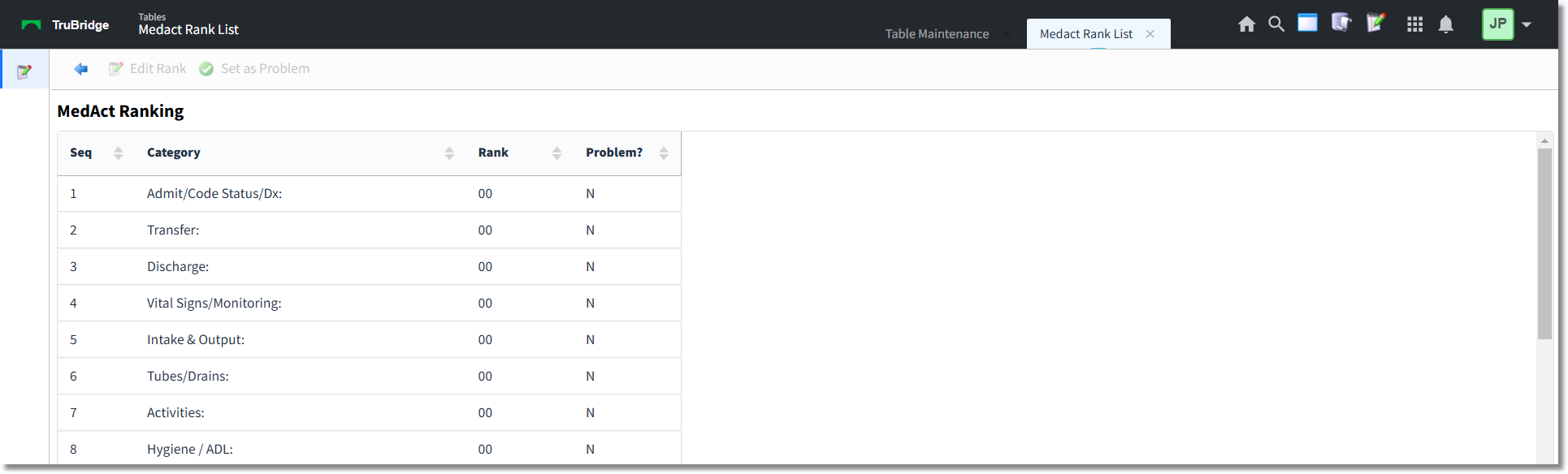
MedAct Ranking
The columns can be sorted by selecting the header. The table displays the following information:
•Seq: Organizes the categories in sequential order.
•Category: Displays the category name.
•Rank: Displays the category rank.
•Problem?: Displays a Y if the category has been designated as nursing problem and a N if the category has not been designated as a nursing problem.
To Edit the Rank of a Category
1.Select (highlight) the entry and select Edit Rank or double-click on the entry. The Edit Rank screen displays.

Edit Rank
2.In the Enter rank box, enter the rank of the category (numeric value from 1-99). Categories display in chronological order if they are not ranked.
3.Select OK to save the rank and return to the list.
NOTE: The option to sort nursing orders by the MedAct Ranking is available in Order Chronology.
To Set or Unset a Category as a Nursing Problem
1.Select (highlight) the entry and select Set as Problem or Unset as Problem.
2.The Problem? column entry will reflect a Y when the category is set as a problem or an N when the category is not set as a problem.