|
<< Click to Display Table of Contents >> Nursing Order Type |
  
|
|
<< Click to Display Table of Contents >> Nursing Order Type |
|
The Nursing Order Type drop-down in Nursing Order setup contains three CCDA options used for post-acute placement: CCDA Referral - Outbound, CCDA Transition of Care - Outbound, and CCDA Evaluate. These order types are accessed through Order Chronology once the orders have been placed, and they launch the user to the corresponding screen.
The drop-down also includes Order Entry launch points that will update the ID Panel and demographics information when the order is placed. These order types are for Suicide Risk, Physician Admit Reason, Isolation, and Code Status.
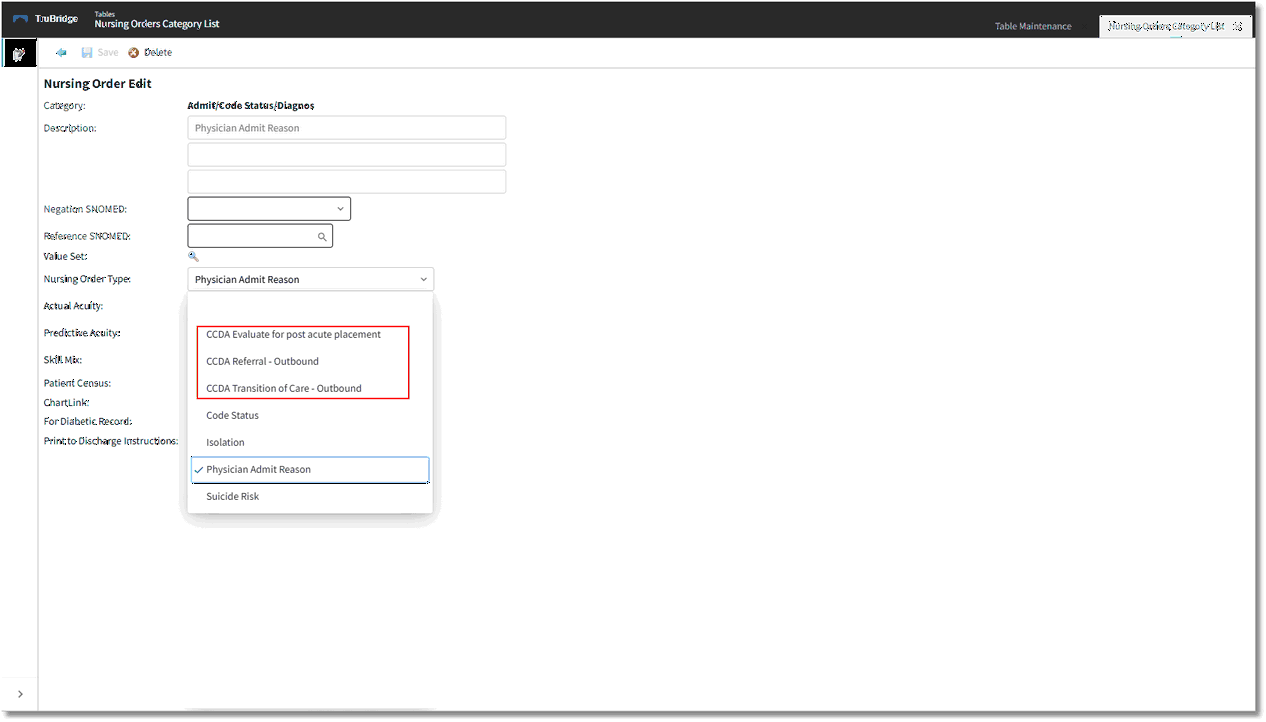
CCDA Nursing Order Categories with Functionality in Order Chronology
Order Type for Order Chronology
•CCDA Transition of Care - Outbound will launch the Referral/Transition of Care screen when selected in Order Chronology.
•CCDA Referral - Outbound will launch the Referral/Transition of Care screen when selected in Order Chronology.
•CCDA Evaluate for post acute placement will launch the Patient Medical Summaries screen.
For more information on this functionality in Order Chronology, please see the Order Chronology user guide.
Order Type for Order Entry
There are several Order Types in the drop-down list that will update the patient's data via Order Entry. The Nursing Order Description for these orders cannot be edited in Order Entry. When these nursing orders with the attached Nursing Order Types are Updated by Nursing or Signed by a Provider, it will update the patient ID Panel at the top of the patient chart as well as the Census.
•Suicide Risk: Adds a Suicide Precaution notification to the ID Panel.
•Physician Admit Reason: Adds the selected Physician Admit Reason to the ID Panel.
•Isolation: Adds an Isolation notification to the ID Panel. When the user hovers over the notification icon, the selected Isolation option will display.
•Code Status: Adds the selected Code Status to the ID Panel. This field will default to either blank or to Assume Full Code (depending on the facility default setting) until an order is entered.