|
<< Click to Display Table of Contents >> Point of Care Control Maintenance - Page 4 |
  
|
|
<< Click to Display Table of Contents >> Point of Care Control Maintenance - Page 4 |
|
Select Web Client > Tables > Clinical > Nursing > POC Control Maintenance > Page 4
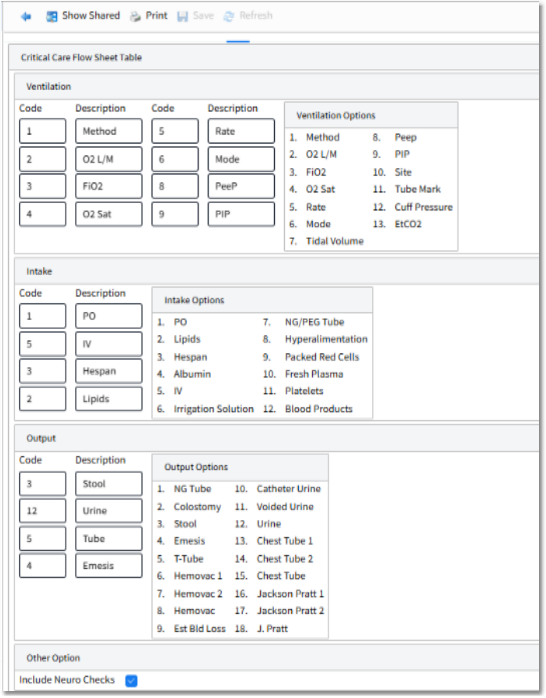
Point of Care Control Maintenance - Page 4
•Ventilation Options: Up to eight options may be selected to display in the Ventilation Mechanics Section of the Critical Care Flow Sheet. Available options are listed below. The description entered for the selected codes may only be up to six characters.
▪1 - Method |
▪5 - Rate |
▪9 - PIP |
▪13 - EtC02 |
▪2 - O2 L/M |
▪6 - Mode |
▪10 - Site |
|
▪3 - FiO2 |
▪7 - Tidal Volume |
▪11 - Tube Mark |
|
▪4 - O2 Sat |
▪8 - PeeP |
▪12 - Cuff Pressure |
•Intake Options: Up to four options may be selected to display in the Intake Section of the Critical Care Flow Sheet. Available options are listed below. The description entered for the selected codes may only be up to six characters.
▪1 - PO |
▪5 - IV |
▪9 - Packed Red Cells |
▪2 - Lipids |
▪6 - Irrigation Solution |
▪10 - Fresh Plasma |
▪3 - Hespan |
▪7 - NG/PEG Tube |
▪11 - Platelets |
▪4 - Albumin |
▪8 - Hyperalimentation |
▪12 - Blood Products |
•Output Options: Up to four options may be selected to display in the Output Section of the Critical Care Flow Sheet. Available options are listed below. The description entered for the selected codes may only be up to six characters. Some items will display the total of other items. For example, item 12, urine, will display the total of item 10, catheter urine, and item 11, voided urine.
▪1 - NG Tube |
▪6 - Hemovac 1 |
▪11 - Voided Urine |
▪16 - Jackson Pratt 1 |
▪2 - Colostomy |
▪7 - Hemovac 2 |
▪12 - Urine |
▪17 - Jackson Pratt 2 |
▪3 - Stool |
▪8 - Hemovac |
▪13 - Chest Tube 1 |
▪18 - J. Pratt |
▪4 - Emesis |
▪9 - Est Bld Loss |
▪14 - Chest Tube 2 |
|
▪5 - T-Tube |
▪10 - Catheter Urine |
▪15 - Chest Tube |
•Include Neuro Checks: Select this option to include Neuro Check documentation on the Critical Care Flow Sheet. Setup must be housed in Neuro Check Setup in order to pull to this section. See the Neuro Checks section in the POC Setup User Guide for additional information.
•After setup is complete, the following options are available:
▪Blue Back Arrow: Select this option to return to the previous screen.
▪Show Shared: Select this option to view setup being shared by multiple facilities.
▪Print: Select this option to print setup.
▪Save: Select this option to save modifications.
▪Refresh: Select this option to refresh the page.