|
<< Click to Display Table of Contents >> Point of Care Control Maintenance - Page 6 |
  
|
|
<< Click to Display Table of Contents >> Point of Care Control Maintenance - Page 6 |
|
Select Web Client > Tables > Clinical > Nursing > POC Control Maintenance > Page 6
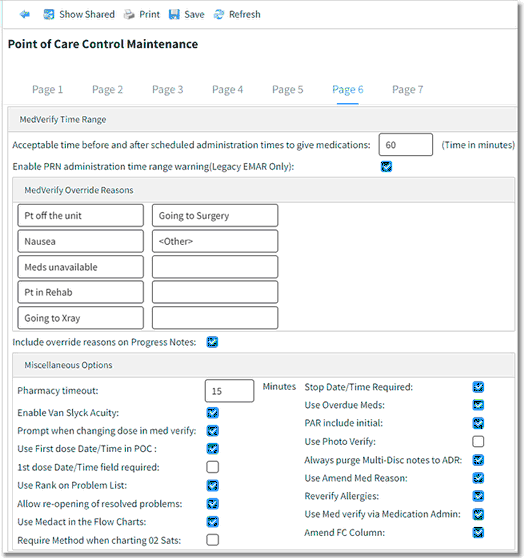
Point of Care Control Maintenance - Page 6
•Acceptable time before and after scheduled administration times to give medications (Time in Minutes): Enter the number of minutes used to determine the acceptable time before and after the schedule date/time to administer medications.
•Enable PRN administration time range warning (Legacy EMAR Only): Select this option to enable the PRN Time Range Warning, which generates in Med-Verify if PRN medications are documented too close together in time. The acceptable time range must be entered on each PRN frequency. Contact to your Pharmacy Department for additional information.
•MedVerify Override Reasons: Enter one to ten Override Reasons to be used when overriding warning prompts in Med-Verify.
•Include override reasons on Progress Notes: Select to include Override Reasons documented via Med-Verify on the Patient Progress Notes.
•Pharmacy timeout: When the TruBridge EHR is left idle in Medication Verification, this field allows for a timeout to be set. When the armband scan times out, the green check will disappear off of the EMAR based on the number of minutes set up in the control table. See the EMAR/MedVerify User Guide for more information.
•Enable Van Slyck Acuity: Select this option to enable access to the Van Slyck Acuity Electronic Form.
•Prompt when changing dose in med verify: If selected, the user will receive a warning prompt when changing the dose of a medication in Med-Verify.
•Use First Dose Date/Time in POC: Select this option to enable the First Dose Date/Time field on the POC Pharmacy Order Entry menu.
•1st dose Date/Time field required: If selected, the First Dose Date/Time field must be OK'd before a POC Pharmacy Order may be updated.
•Use Rank on Problem List: Select this option to allow Rank to be entered when the problem is being selected for the patient.
•Allow re-opening of resolved problems: Select to enable the Re-Open option on the Problem List.
•Use Medact in the Flow Charts: Select to enable the Medact Icon on Flow Charts.
•Require Method when charting O2 Sats: If selected, O2 Sats cannot be updated unless a Method is charted. The O2 Combo Box is recommended. When this option is selected, O2 Sat cannot be documented via the Vital Sign Combo Box.
•Stop Date/Time Required: Select to enable the ability to enter a Stop Date/Time on the POC Pharmacy Order Entry menu.
•Use Overdue Meds: If selected, Overdue Medications will display in green on the EMARs.
•PAR include Initial: When selected, the Problem Activity Report will include information charted on the Initial Physical Assessment in Point of Care.
•Use Photo Verify: Select this option to enable Photo Verify via Med-Verify.
•Always purge Multi-Disc notes to ADR: When selected, the Multi-Disciplinary Progress Notes will purge to ADR separate from the Nursing Patient Progress Notes.
•Use Amend Med Reasons: If selected, the user must enter a reason when amending a medication administration.
•Reverify Allergies: Select to enable the ability to verify allergies via the 24-hr and 8-hr EMARS, All Current Scheduled Medications, and Med-Verify user areas.
•Use Med Verify Via Medication Admin: When selected, Med-Verify may be accessed from all EMAR screens.
•Amend FC Column: Select to enable the ability to amend (strike) all data documented under the same Date/Time Column at one time.
•After setup is complete, the following options are available:
▪Blue Back Arrow: Select this option to return to the previous screen.
▪Show Shared: Select this option to view setup being shared by multiple facilities.
▪Print: Select this option to print setup.
▪Save: Select this option to save modifications.
▪Refresh: Select this option to refresh the page.