|
<< Click to Display Table of Contents >> Hemodynamic Vital Sign Entry (Hospital and ED Only) |
  
|
|
<< Click to Display Table of Contents >> Hemodynamic Vital Sign Entry (Hospital and ED Only) |
|
To document hemodynamic vital signs, select Hemodynamic Vital Sign Entry.
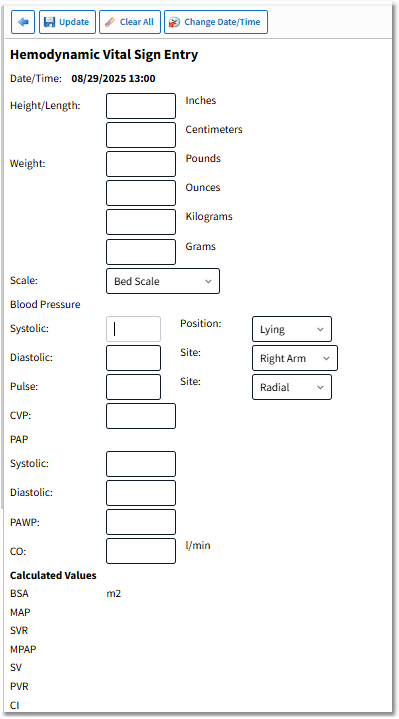
Hemodynamic Vital Sign Entry
Action Bar Options
•Back Arrow: Returns the user to the Vital Signs Selection screen.
•Update: Saves the entered data.
•Clear All: Clears the data from all fields.
•Change Date/Time: Launches the Change Date/Time screen.
Hemodynamic Vital Sign Entry Fields
•Date/Time: Displays the date and time of documentation.
•Height/Length may be entered in Inches or Centimeters.
▪The system calculates the unentered value.
•Weight may be entered in Pounds and Ounces or Kilograms and Grams.
▪The system calculates the unentered values.
▪Pounds may display with a maximum of four numeric characters. Any decimal entered (fraction of a pound) will automatically convert to ounces and display in the Ounces field.
▪Ounces may display with a maximum of two numeric characters before the decimal and two numeric characters after the decimal.
▪Kilograms may display with a maximum of four numeric characters before the decimal and two numeric characters after the decimal.
▪Grams may display with a maximum of six numeric characters.
•Scale: The following scale types are available from the drop-down: Stated, Bed Scale, Sling Scale, Floor Scale, Chair Scale, Newborn Scale, Estimated, and OTHER (allows a free text answer to be entered).
•Blood Pressure requires the entry of Systolic and Diastolic values, then select the Position and Site from the available drop-downs.
▪Only a numeric entry is allowed with up to three characters.
▪The following blood pressure positions are available from the drop-down: Lying, Sitting, Standing, Doppler, and OTHER (allows a free text answer to be entered).
▪The following blood pressure sites are available from the drop-down: Right Arm, Left Arm, Right Leg, Left Leg, and OTHER (allows a free-text answer to be entered).
•Pulse may be entered. Select the Site from the available drop-down.
▪Only a numeric entry is allowed with up to three characters.
▪The following pulse sites are available from the drop-down: Pulse Ox, Radial, Brachial, Femoral, Carotid, Apical, Monitor, and OTHER (allows a free-text answer to be entered).
•CVP: Only a numeric entry is allowed with up to three characters.
•PAP: Requires the entry of Systolic and Diastolic values. Only a numeric entry is allowed with up to three characters.
•PAWP: Only a numeric entry is allowed with up to six characters.
•CO: Only a numeric entry is allowed with up to three characters.
Once all the necessary values are entered, the calculated values for BSA, MAP, SVR, MPAP, SV, PVR, and CI will display.