|
<< Click to Display Table of Contents >> Vital Signs Review |
  
|
|
<< Click to Display Table of Contents >> Vital Signs Review |
|
If vital signs have been entered on the visit, when the Vitals application is accessed, the Vital Signs Review screen displays by default. The Review Style defaults to Grid and the Visit selection defaults to Current Visit.
NOTE: Pulse, Respiration, Blood Pressure, and Pain Scale may also be documented on the PCA Assessment in the MAR application. Vital signs entered on the PCA Assessment display on the Vital Signs Review screen. See the MAR/MedVerify User Guide for additional details on the PCA Assessment.
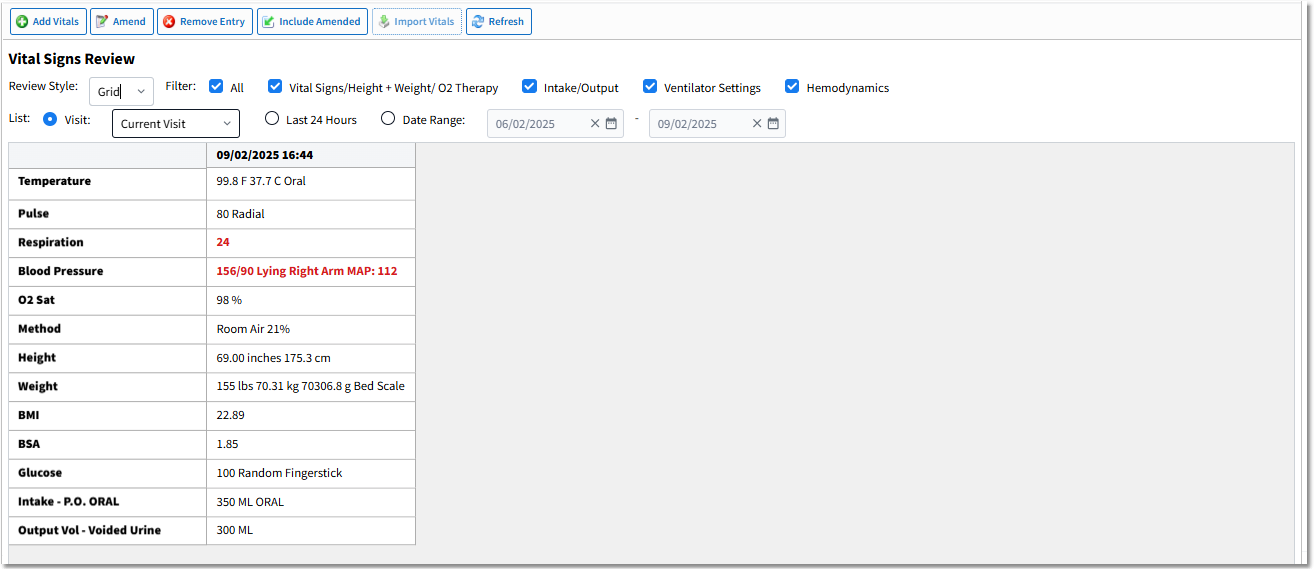
Vital Signs Review - Grid
Action Bar Options
•Add Vitals: Select to add vital signs.
•Amend: Select the vital sign entry or entries to amend and then select Amend. Entries can only be amended by the employee who entered the vital signs.
•Remove Entry: Select the vital entry or entries to remove and then select Remove Entry. Vital entries can only be removed by the employee who entered the vitals.
NOTE: If vital signs were originally documented on the PCA Assessment and removed from the Vitals application, the vital signs will also be removed from the Order Detail screen. In turn, if a PCA assessment is removed that includes vital signs documentation, the vital signs will also be removed from the Vitals application.
•Include Amended: Select to display the amended vital entries.
•Import Vitals: This option will be active if your facility has purchased a vital signs interface and there are vital signs available to be imported from the interface.
•Refresh: Select to refresh the screen.
Review Style, Filter, and List Options
•Review Style: Use the drop-down to change the display view. Options are Grid (default) or List.
•Filter: Select the check boxes to view the vitals in the display or deselect the check boxes to remove the vitals from the display. Options include All (default), Vital Signs/Height + Weight/ O2 Therapy, Intake/Output, Ventilator Settings (Hospital & ED Only), and Hemodynamics (Hospital & ED Only).
•List: Allows for data to be viewed based on the patient's visit(s) or a date range.
▪Visit: Select the radio button and then use the drop-down to select the visit option. Options include Current Visit (default), Last 3, Last 5, Last 10, or All Visits.
▪Last 24 Hours: Select the radio button to display the last 24 hours of vital sign data.
▪Date Range: Select the radio button to display vital sign data for a specific date range. The date range defaults to three months prior to the current date. The date range may be changed via the calendar date pickers or by typing the dates in the appropriate fields.
Display Columns - Grid View
In Grid view, the first column displays the descriptions of the vital signs entered. The remaining columns display the date and time the vital signs were entered and the corresponding vitals that were entered at that time. Any vital signs that fall below or above the defined ranges will display in red bold text.
NOTE: The Grid view displays a maximum of 800 records for any visit or date range. If the selected range exceeds 800 records, the following message displays: "There is too much data for this view. Please restrict your requested ranges or switch to list view." Selecting OK will display a maximum of 800 records in the Grid view.
Display Columns - List View
When List is selected from the Review Style drop-down, the Vital Signs Review screen displays the vital entries in a list format.
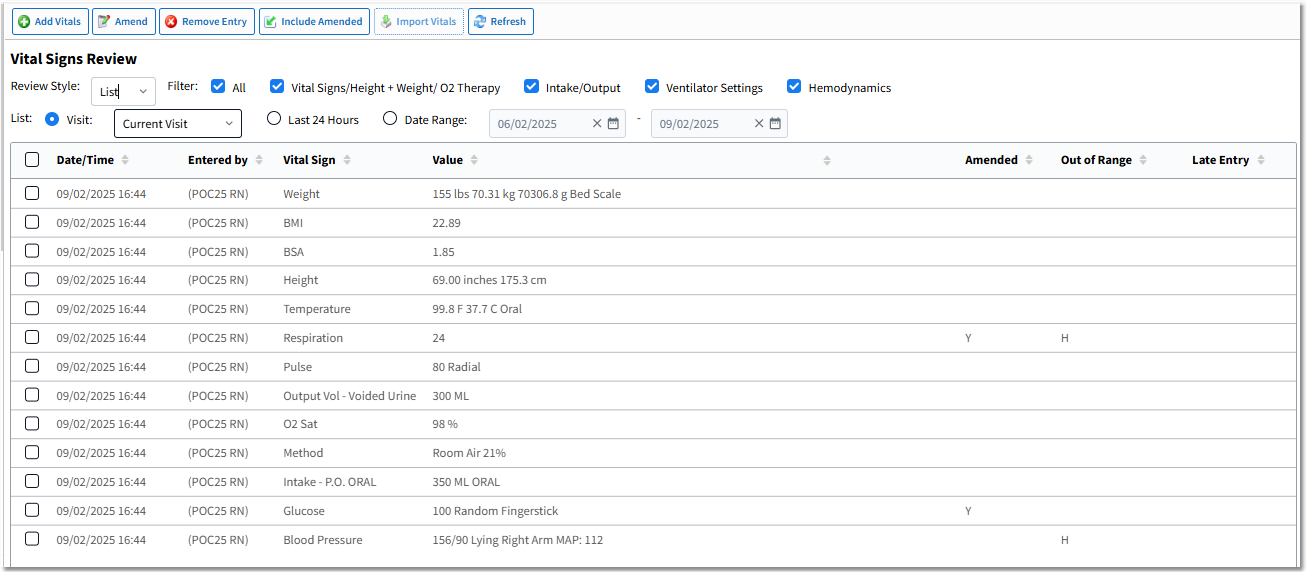
Vital Sign Review - List
The columns in List view are as follows.
•Date/Time: Displays the date and time of the entry.
•Entered by: Displays the login and credentials of the user who entered the vital sign.
•Vital Sign: Displays the vital sign type.
•Value: Displays the values entered.
•Well Child Visit: Displays a Y if the visit is classified as a Well Child Visit (18 years or younger and in a Clinic location) in Patient Maintenance. These vitals are documented as well child measurements and pull to growth charts.
•Amended: Displays a Y if the entry represents an amended value.
•Out of Range: Displays an H if the value falls above the defined range or an L if the value falls below the defined range for the vital sign.
•Late Entry: Displays the date and time of an entry that was tagged as a late entry.