|
<< Click to Display Table of Contents >> Intake/Output Entry |
  
|
|
<< Click to Display Table of Contents >> Intake/Output Entry |
|
To document intake and output, select Intake/Output Entry.
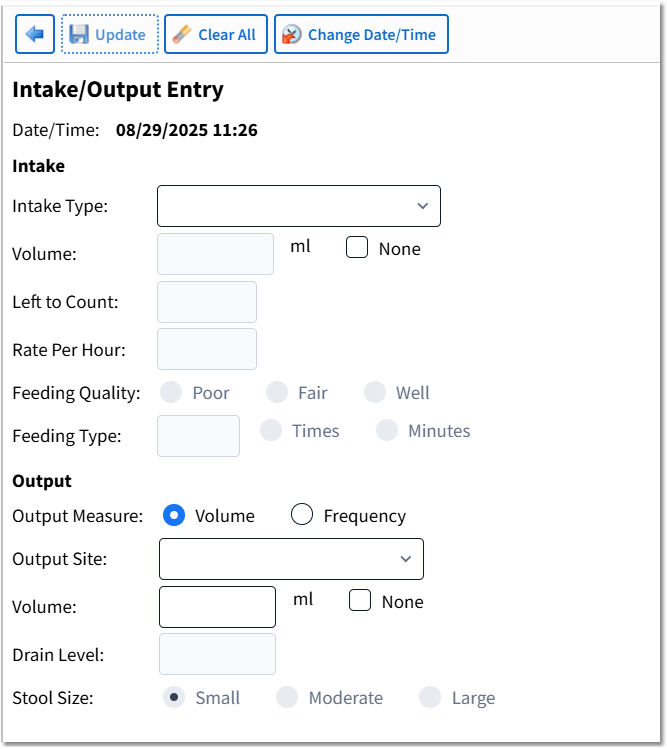
Intake/Output Entry
Action Bar Options
•Back Arrow: Returns the user to the Vital Signs Selection screen.
•Update: Saves the entered data.
•Clear All: Clears the data from all fields.
•Change Date/Time: Launches the Change Date/Time screen.
Intake/Output Entry Fields
•Date/Time: Displays the date and time of documentation.
Intake options are as follows:
•Intake Type: Use the drop-down to select the intake type.
NOTE: Pediatric or Nursery intake options will display in the drop-down if the Pediatric or Nursery Chart Type has been selected via the Chart Menu within a flow chart.
Adult Intake Options: |
Pediatric Intake Options: |
Nursery Intake Options: |
Oral |
Oral |
Oral |
NG/Peg Tube Feeding |
Oral - Formula |
Oral - Formula |
Hyperalimentation |
Oral - Baby Food |
Oral - Pedialyte |
Lipids |
Oral - Pedialyte |
Oral - Sterile Water |
Hespan |
NG/Peg Tube Feeding |
Oral - 5% Glucose Water |
Albumin |
Irrigation Solution |
NG/Peg Tube Feeding |
Packed Red Blood Cells |
Fresh Frozen Plasma |
Left/Right Breast |
Fresh Frozen Plasma |
Platelets |
Left Breast |
Platelets |
Packed Red Blood Cells |
Right Breast |
Irrigation Solution |
Hyperalimentation |
IV Fluids |
IV Fluids |
Left/Right Breast |
Other (allows free text entry) |
Other (allows free text entry) |
Left Breast |
|
|
Right Breast |
|
|
IV Fluids |
|
|
Other (allows free text entry) |
|
•Volume: Enter amount consumed displayed in milliliters. If NG/Peg Tube Feeding is selected, enter the capacity of the source displayed in milliliters.
•None: Options are unchecked and checked (þ)
▪Unchecked (default): Allows an amount to be entered in the Volume field.
▪Checked (þ): Automatically sets the Volume field to 0 ml.
•Left to Count: Available when NG/Peg Tube Feeding is selected from Intake Type. Enter the remaining volume in milliliters.
•Rate Per Hour: Available when NG/Peg Tube Feeding is selected from Intake Type. Enter the amount of fluid in milliliters consumed within one hour.
•Feeding Quality: Available when Left/Right Breast, Left Breast, or Right Breast is selected from Intake Type. Options are Poor, Fair, and Well.
•Feeding Type: Available when Left/Right Breast, Left Breast, or Right Breast is selected from Intake Type. This is a two-digit field with radio button options for Times and Minutes.
NOTE: The following Nursery Intake Options have been set up with SNOMED codes for Clinical Quality Measures (eCQM) reporting: Oral - Formula, Oral - Pedialyte, Oral - Sterile Water, Oral - 5% Glucose Water, Left/Right Breast, Left Breast, and Right Breast.
Output options are as follows:
•Output Measure: Select the output measure. Options are Volume and Frequency.
•Output Site: Use the drop-down and select the output site.
NOTE: Pediatric or Nursery output options will display in the drop-down if the Pediatric or Nursery Chart Type has been selected via the Chart Menu within a flow chart.
Adult Output Options: |
Pediatric Output Options: |
Nursery Output Options: |
Voided Urine |
Voided Urine |
Voided Urine |
Catheter Urine |
Catheter Urine |
Catheter Urine |
Stool |
Wet Diapers |
Wet Diapers |
Colostomy |
Stool |
Stool |
Emesis |
Colostomy |
Emesis |
NG Tube |
Emesis |
NG Tube |
Estimated Blood Loss |
NG Tube |
Chest Tube |
T-Tube |
Estimated Blood Loss |
Estimated Blood Loss |
Jackson Pratt #1 |
T-Tube |
Other (allows free text entry) |
Jackson Pratt #2 |
Jackson Pratt #1 |
|
Chest Tube |
Jackson Pratt #2 |
|
Hemovac #1 |
Chest Tube |
|
Hemovac #2 |
Hemovac #1 |
|
Other (allows free text entry) |
Hemovac #2 |
|
|
Other (allows free text entry) |
|
•Volume: Displays instead of Frequency when Volume is selected for Output Measure. Enter the output in milliliters.
•Frequency: Displays instead of Volume when Frequency is selected for Output Measure. Enter the number of times output is produced.
•None: Options are unchecked and checked (þ)
▪Unchecked (default): Allows an amount to be entered in the Volume or Frequency fields.
▪Checked (þ): Automatically sets the Volume field to 0 ml or the Frequency field to 0 times. If documenting frequency, "NONE" will be displayed on the Review screen.
•Drain Level: Available when NG Tube or Chest Tube is selected from the Output Site drop-down.
•Stool Size: Available when Stool is selected from Output Site drop-down. Options are Small (default), Moderate, and Large.