|
<< Click to Display Table of Contents >> Vital Signs/Height/Weight/O2 Therapy |
  
|
|
<< Click to Display Table of Contents >> Vital Signs/Height/Weight/O2 Therapy |
|
To document vital signs, height/weight, and O2 therapy, select Vital Signs/Height/Weight/O2 Therapy Entry.
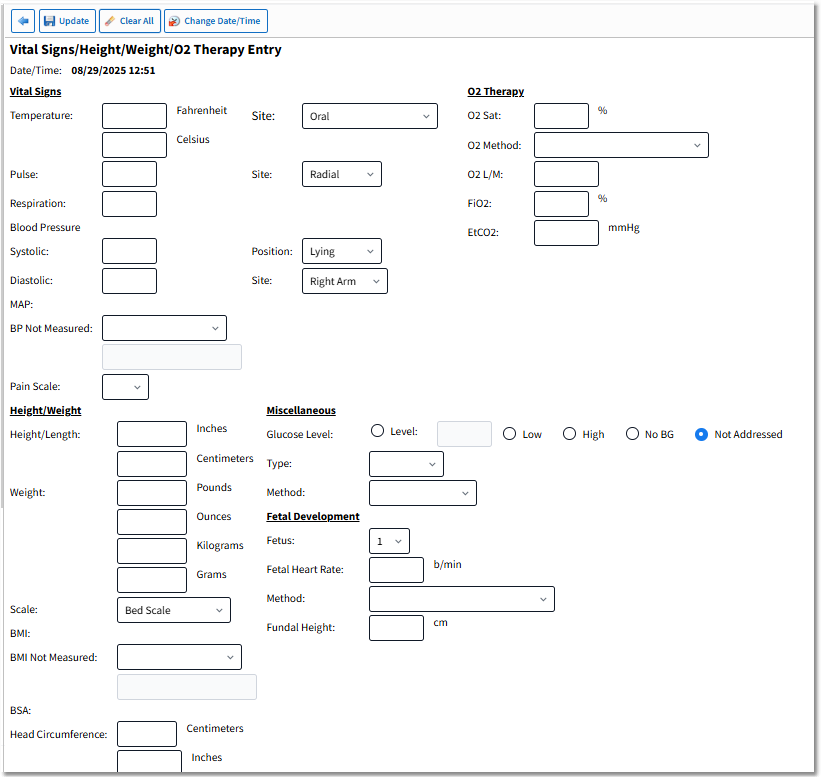
Vital Signs/Height/Weight/O2 Therapy Entry
Once selected, individual or multiple vital signs may be documented.
If a vital sign range is set up for the department in Tables > Clinical > Vital Signs category > Vital Sign Ranges, required fields and defaults may be customized. Specific ranges may be set based on age range and gender for the following vital signs.
•Temperature Range: A low and high range for temperature may be defined, including the ability to set a Default Site and the option to select Site Required.
•Pulse Range: A low and high pulse range may be defined, including the ability to set a Default Site and the option to select Site Required.
•Respiration Range: A low and high respiration range may be defined.
•Blood Pressure Range: A low and high range for systolic and diastolic blood pressure may be defined, including the ability to set a Default Position and Site as well as the option to select Position and Site Required.
•O2 Sat Range: A low range for O2 Saturation may be defined, including the ability to set a Default Method and indicate that an O2 Method is required when O2 Sat is documented.
•EtCO2 Range: A low and high range for EtCO2 may be defined.
•Weight Scale: A default Scale Type may be set, and the option to select Scale Type Required.
When documenting vital signs, any entries that fall below or above the defined ranges will display the warning, "Value out of range" in red bold text to the right of the field. If the Site, Position, Method, or Scale Type fields are set to "Required," the field label will display in red text and entries cannot be saved until the required fields have been addressed.
Action Bar Options
•Back Arrow: Returns the user to the Vital Signs Selection screen.
•Update: Saves the entered data.
•Clear All: Clears the data from all fields.
•Change Date/Time: Launches the Change Date/Time screen.
Vital Signs/Height/Weight/O2 Therapy Entry Fields
•Date/Time: Displays the date and time of documentation.
•Vital Signs:
▪Temperature may be entered in Fahrenheit or Celsius. Select the Site from the available drop-down.
oOnly numeric entry with one decimal is allowed with up to five characters.
oThe system calculates the unentered value.
oThe following temperature sites are available from the drop-down: Oral, Rectal, Axillary, Tympanic, Bladder, Swan Ganz, Temporal Scanning, Temporal, Temporal Artery, Ear, and OTHER (allows a free text answer to be entered).
▪Pulse may be entered. Select the Site from the available drop-down.
oOnly numeric entry with one decimal is allowed with up to three characters.
oThe following pulse sites are available from the drop-down: Pulse Ox, Radial, Brachial, Femoral, Carotid, Apical, Monitor, and OTHER (allows a free text answer to be entered).
▪Respiration may be entered.
oOnly numeric entry is allowed with up to three characters.
▪Blood Pressure requires the entry of Systolic and Diastolic values; then select the Position and Site from the available drop-down. Once the systolic and diastolic values have been entered, MAP (Mean Arterial Pressure) will automatically calculate.
oOnly numeric entry is allowed with up to three characters.
oThe following blood pressure positions are available from the drop-down: Lying, Sitting, Standing, Doppler, and OTHER (allows a free text answer to be entered).
oThe following blood pressure sites are available from the drop-down: Right Arm, Left Arm, Right Leg, Left Leg, and OTHER (allows a free text answer to be entered).
▪BP Not Measured reason may be selected for the drop-down. Options are Medical/Other and Patient Refused.
▪Pain Scale may be selected from the available drop-down. The following are available from the pain scale drop-down: 0 - No Pain, 1, 2, 3, 4, 5 - Moderate Pain, 6, 7, 8, 9, 10 - Worst Possible Pain.
•Height/Weight:
▪Height/Length may be entered in Inches or Centimeter.
oThe system calculates the unentered value.
oMaximum of two numeric characters before the decimal and two numeric characters after the decimal for Inches.
▪Weight may be entered in Pounds and Ounces or Kilograms and Grams, then the Scale.
oThe system calculates the unentered value.
oPounds may display with a maximum of four numeric characters.
oOunces may display with a maximum of two numeric characters before the decimal and three numeric characters after the decimal.
oKilograms may display with a maximum of three numeric characters before the decimal and two numeric characters after the decimal.
oGrams may display with a maximum of six numeric characters.
oThe following scale types are available from the Scale drop-down: Stated, Bed Scale, Sling Scale, Floor Scale, Chair Scale, Newborn Scale, Estimated, and OTHER (allows a free text answer to be entered).
▪BMI is calculated from the height and weight entered.
oThe calculation shall not exceed three numeric characters before the decimal and two numeric after the decimal. This field will also not expect a BMI calculation over 999.
▪BMI Not Measured reason may be selected from the drop-down. Options are Medical/Other and Patient Refused.
▪BSA is calculated from the height and weight entered.
oThe calculation shall not exceed two numeric characters before the decimal and two numeric characters after the decimal.
▪Head Circumference may be entered in Centimeters or Inches.
oThe system calculates the unentered value.
oThe entry shall not exceed two numeric characters before the decimal and two numeric characters after the decimal for Centimeters or Inches.
•O2 Therapy:
▪O2 Sat with a maximum of three numeric characters.
▪The O2 Method may be selected from the drop-down with the following options available: Bi-Pap, C-Pap, High Flow Nasal Cannula, Non-Rebreather Mask, O2 Cannula, Oxy-Mask, Partial Rebreather Mask, Room Air 21%, Simple Mask, T-Piece, Venti Mask, Ventilator, and OTHER (allows a free text answer to be entered).
NOTE: If Ventilator is selected as the O2 Method, the FiO2 and EtCO2 fields become inactive. Once Update is selected, the Ventilator Settings Entry screen is displayed where the FiO2 and EtCO2 can be entered.
▪O2 L/M with a maximum of two numeric characters before the decimal and two numeric characters after the decimal.
▪FiO2 with a maximum of three numeric characters.
▪EtCO2 with a maximum of two numeric characters before the decimal and two numeric characters after the decimal.
•Miscellaneous:
▪Blood Glucose may be addressed by selecting an option from the series of radio buttons with the following answer options: Level, High, Low, No BG, and Not Addressed. The radio button option for Level is followed by a text box that will allow up to three numeric characters. If any radio button is selected other than Level, the Level Text box will be disabled and blank.
▪Type may be selected from the drop-down with the following options available: Average, Daily, Fasting, Random, and OTHER (allows a free text answer to be entered).
▪Method may be selected from the drop-down menu with the following options available: Arterial, Finger Stick, Heel Stick, Venipuncture, and OTHER (allows a free text answer to be entered).
▪Well Child Visit? may be selected to document the visit as Well Child, which flags this set of vitals as well as child measurements to pull to growth charts. This field is only available for clinic patients who are 18 years of age or younger.
NOTE: To view Growth Charts, please see the Reports & Attachments User Guide.
•Fetal Development: This section will populate below the Miscellaneous section if the patient is female and has been indicated as "Pregnant - Y" in the patient's demographic information.
▪Fetus: The number of fetuses may be indicated in the drop-down. The options range from 1-6. The default is one.
▪Fetal Heart Rate: The fetal heart rate in beats per minute may be indicated in this field.
▪Method: The method of obtaining the fetal heart rate may be indicated in the drop-down. The options are Handheld Doppler, Transabdominal Ultrasound, Transvaginal Ultrasound, and OTHER (allows a free text answer to be entered).
▪Fundal Height: The height from the pubic bone to the top of the uterus may be entered in this field in centimeters (maximum of 3 characters).