|
<< Click to Display Table of Contents >> Visual Indicators |
  
|
|
<< Click to Display Table of Contents >> Visual Indicators |
|
Visual indicators in the Forms column on the Scheduled Appointments tab will assist in determining where the form falls within the forms request process. The following dot colors represent the following statuses:
•Black = Pending
•Blue = Returned
•Red = Error
•Orange = Reconciliation Needed
•Green = Complete
Along with the dot notation, a progress bar will display if there are forms in a pending state. Once all forms have been returned successfully, the progress bar will no longer display.
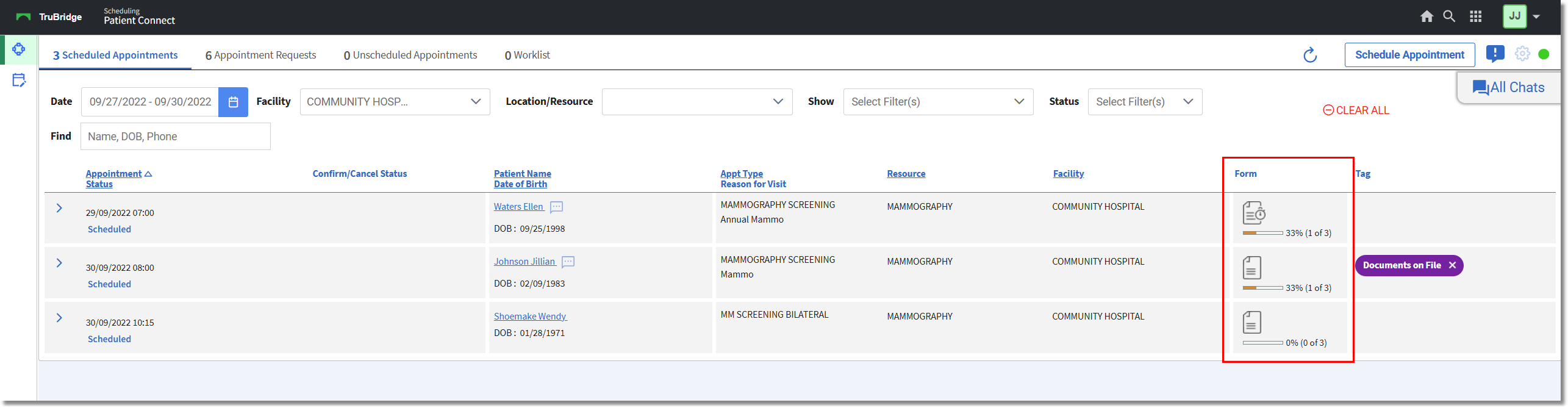
Scheduled Appointments Tab
Once forms have been requested for a patient, the Form icon will then display with a clock  . The clock will be removed once all forms have been received or the forms request link has expired.
Hovering over the forms icon will display the requested forms and their status along with the date the forms were placed at their current status. It will also display Visit or Profile at the end of each form to indicate where the form is to be stored.
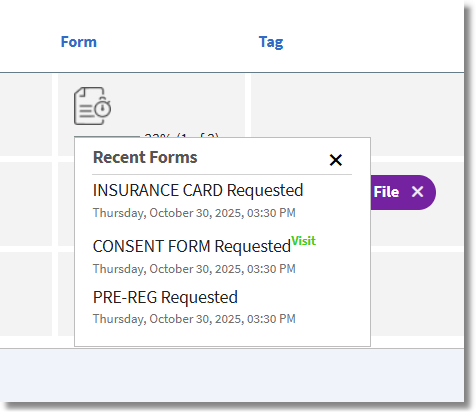
Scheduled Appointments Tab - Form Column